How to Create a Training Manual: a Step-by-step Guide
A global survey showed that the majority of respondents from different age groups believe learning is crucial to success in their careers. With many organizations adopting a hybrid work model, providing access to online materials has become essential to any training process.
If you want to learn how to create a training manual for your employees, co-workers, students or customers, this article is for you. You will learn the most straightforward and time-saving method for constructing easy-to-follow, visual online guides. Let’s dive in!
How to create a training manual with MagicHow
To create an effective training manual, follow these steps:
Define your goal and audience

Before creating a training manual, think of what you want your audience to know or be able to do after completing the training. Clearly define the skills, knowledge or competencies the manual should help participants acquire.
You should also consider your intended audience – who they are and how and where they will access your training document. To gain a better picture of whom you are writing for, answer the following questions about your audience:
- What is their motivation?
- How much time can they commit to the training?
- What industry do they represent?
- What is their level of expertise?
It will help you to create content tailored to their needs.
Build your training manual step by step
Define goals and audience, then record processes and get guides in minutes.
Create an outline

List everything you want to include in your manual and think of the best way to structure it. Decide in what order to present particular topics so the content has a logical flow.
You can take different approaches to organize your content, e.g., from the simplest to most advanced topics or arrange it in sections corresponding to a product’s features.
It’s a good idea to add a table of contents – it will help you to organize the content, and your readers will be able to search the manual for topics that interest them.
Choose process documentation software
The best way to swiftly outline the steps for a training manual is to use process documentation software that captures and documents all the steps you go through in a task and adds them to your training manual content.
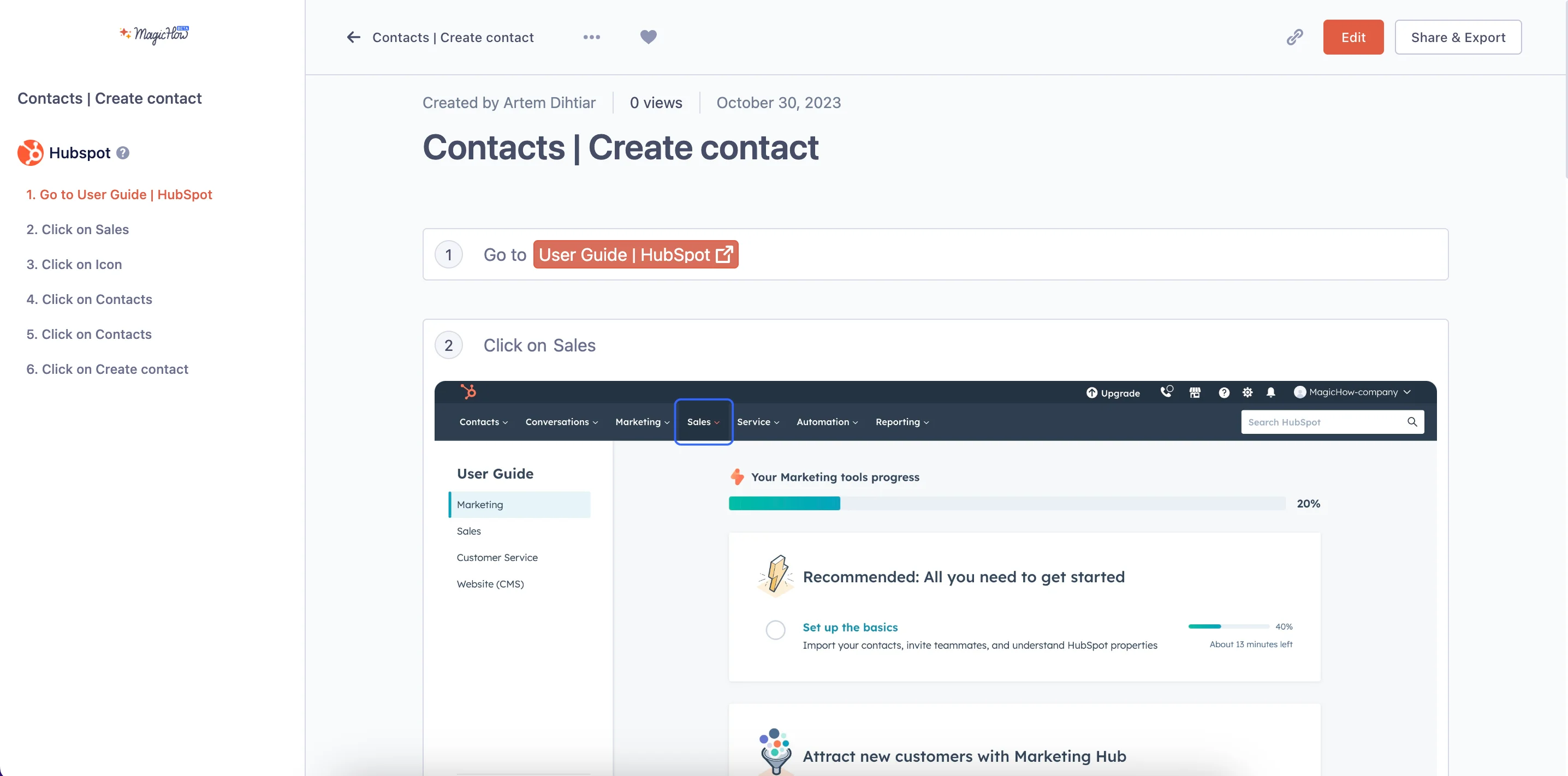
Our recommendation is MagicHow – an intuitive and easy-to-use software application that allows you to create:
- Training manuals
- How-to guides
- Tutorials
- Instructions
- Knowledge bases
- Business process documentation
With it, you can create manuals for various purposes, such as:
Here’s how to use the tool.
Create training manuals in minutes
Record workflows once—get annotated steps and screenshots to share with your team.
Install it

Choose how you want to use MagicHow. You can download the desktop version or add it as an extension to your browser. MagicHow is compatible with Chrome, Firefox, Edge and Safari.
Record the process
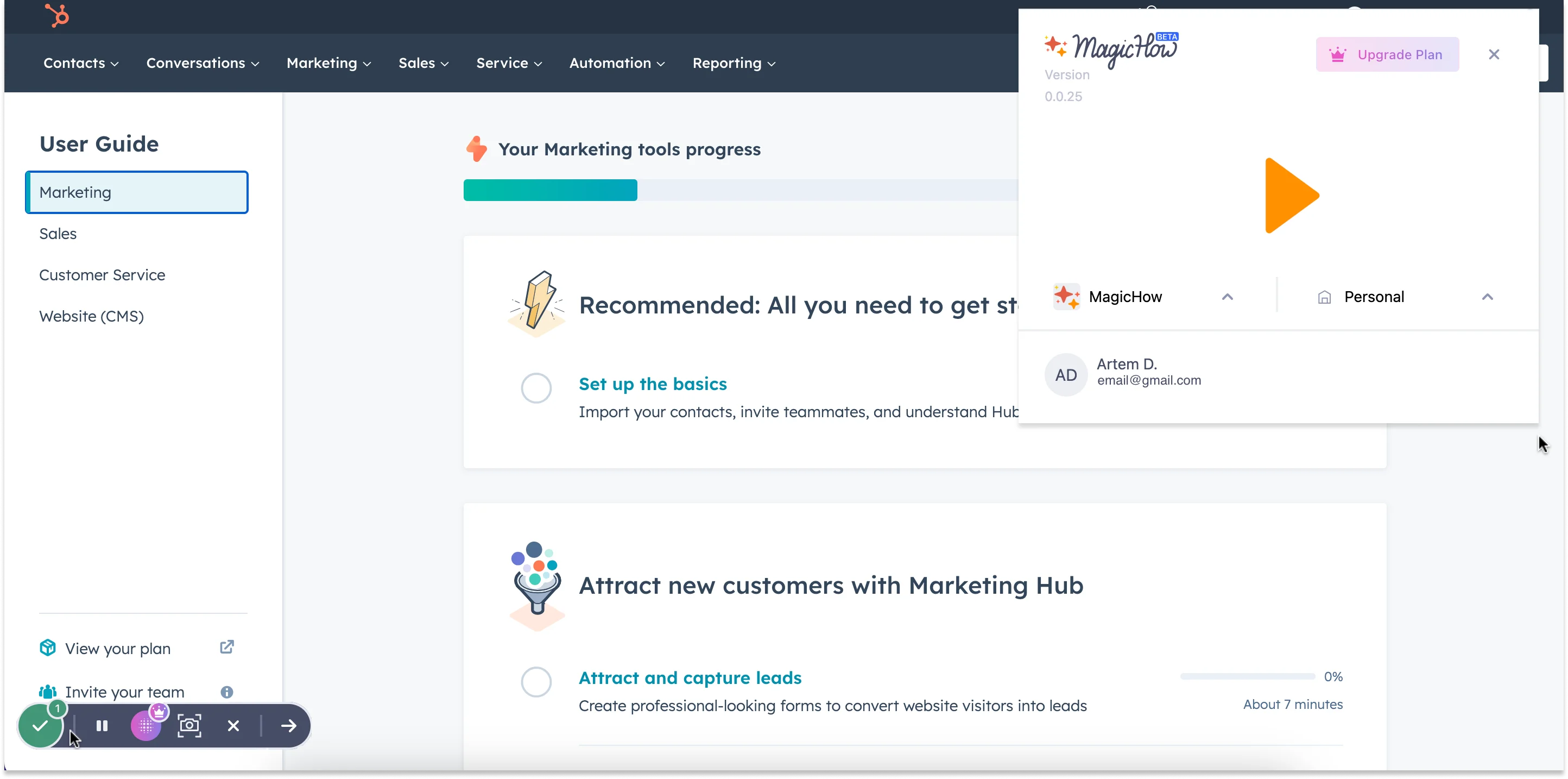
To create a training manual with MagicHow, all you have to do is start the in-app screen recorder. Then, go through the process you want to create a training manual for, and MagicHow will record everything, splitting it into logical steps.
Customize your manual
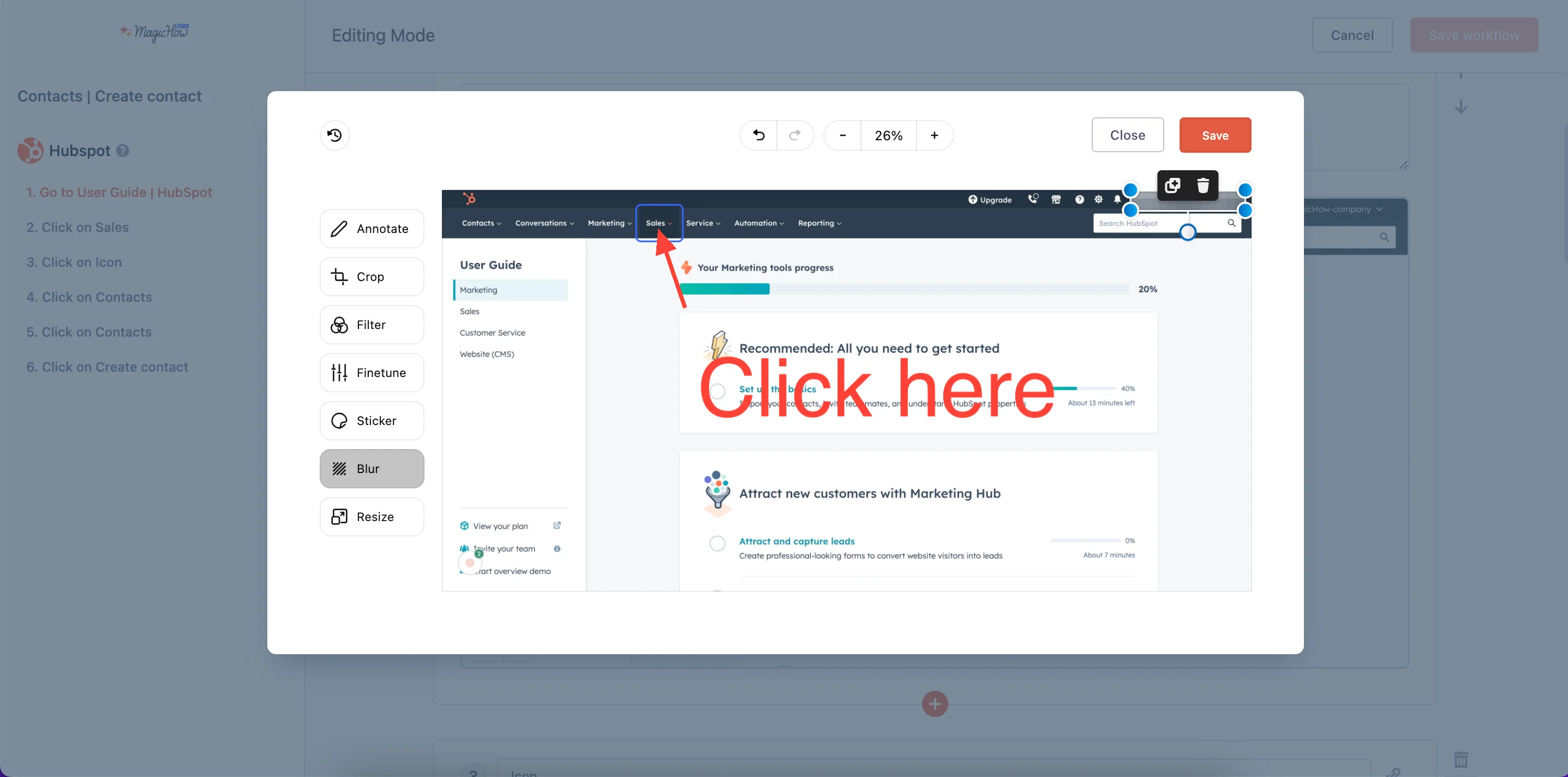
MagicHow offers plenty of customization options to modify the training material according to your liking. You can:
- Add steps’ titles and descriptions: Add extra information to the steps or title them to make the manual more transparent and attractive.
- Blur sensitive data: Protecting sensitive information on images in your training manual is essential. MagicHow allows you to blur confidential data such as personal information, passwords or proprietary content.
- Crop a picture: Remove any irrelevant or distracting elements from your screenshots.
- Add logos to your screenshots: Incorporate your organization’s logo or branding to reinforce your brand identity and create a more professional appearance. This step can help establish a visual connection between the training materials and your organization.
- Change style: Ensure your training materials maintain a coherent and professional look throughout the manual. Consistency in style, including colors and fonts, can increase your training content’s visual appeal and readability.
- Replace or merge the slides: You may need to replace or merge slides to streamline the content. This step helps avoid redundancy and ensures the information has a logical flow.
To create effective training manuals, follow these process documentation best practices:
- Use actionable verbs: Make the instructions more direct and practical by clearly defining the actions your audience needs to take. Start each instruction with an actionable verb: click, type, review or analyze.
- Make it easy to skim: Use formatting techniques like headings, bullet points and numbered lists to make important points stand out. Provide a table of contents and index for easy reference.
- Keep it simple and concise: Ensure your language is straightforward and avoid jargon or technical terms that your audience may be unfamiliar with. Be concise and to the point. Avoid unnecessary expressions that can lead to confusion.
- Add examples and visuals: Supplement your training manuals with visual aids, such as diagrams, charts or images. It can help clarify complex concepts and help learners better understand the material.
- Explain why something is important: Help your audience understand the significance of the information or task they are learning. Explain how it relates to their job, the organization’s goals or the broader context.
- Provide a glossary: Include a glossary of key terms and acronyms to assist learners in understanding and referencing unfamiliar words and abbreviations.
Share your manual
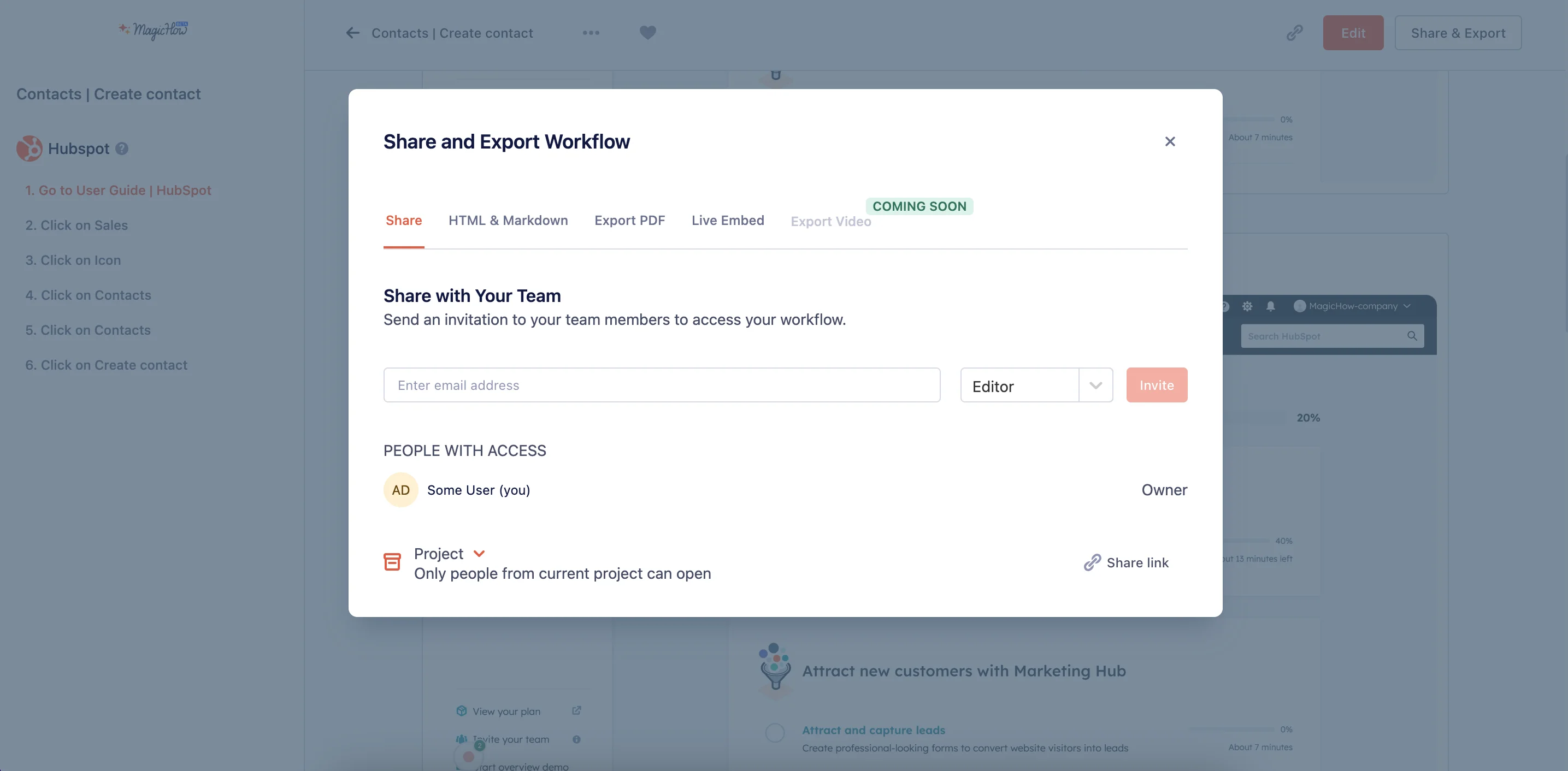
After ensuring that your training manual is well-written, it’s time to make it accessible to your audience. MagicHow allows you to share the guide by:
- Using the link configuring access settings
- Exporting a manual in PDF
- Copying a guide as HTML or Markdown to post it on third-party websites
- Embedding a guide in Notion, Confluence, Zendesk, Webflow and other tools
Ask for feedback and update if needed
When your comprehensive training manual is ready, ask a few individuals representing your target audience to test it for clarity and usability. Their feedback can help identify areas for improvement.
Make the necessary updates and revisions to the training manual based on the feedback you received. Ensure the content is accurate, clear and aligned with the learners’ needs.
Why is creating a training manual important?
Making an engaging training manual can provide many benefits for organizations, employees and learners. Here are some:
- Standardization of training: Training manuals ensure consistency in the delivery of information and adaptation of procedures. Every learner receives the same content and instructions. It is essential in the working environment since standardization of staff training leads to increased efficiency.
- Time and cost savings: According to reports, companies, on average, spent $1,071 on training per learner. Online employee training manuals can significantly reduce the time and cost of training as they provide a structured and self-paced learning resource.
- Improved employee onboarding: Training manuals play a crucial role in onboarding new employees. They provide guidance and information on policies, procedures and workflows, leading to increased worker knowledge and reduced number of mistakes. A strong onboarding process is vital since it can help you retain top talent.
- Enhanced employee experience: Providing well-structured training materials can improve the overall employee experience. 77% of employees admit they feel more productive and empowered when they can access clear, easy-to-follow guidance.
- Improved employee collaboration: Manuals outline standardized processes and guidelines, ensuring that everyone follows the same steps, for example, when implementing new tools or adopting new procedures. This consistency reduces confusion and errors, which can be particularly beneficial in team-based projects where tasks are interdependent.
- Risk mitigation: An employee training manual can include compliance and risk management guidelines. By following them, team members reduce the risk of errors or non-compliance, which can significantly impact collaborative projects.
Create your training manual in minutes
Turn any process into a clear, shareable manual—no manual writing required.
Conclusion
Following the steps outlined in this guide, you can create a comprehensive training manual in no time. MagicHow is a user-friendly SOP tool with plenty of customization options. It is compatible with third-party apps like Zendesk, Confluence or Notion.
MagicHow has a free plan that gives you access to the set of core features, including capturing at any browser and sharing by link.
Start creating training manuals today
Record processes once and get step-by-step manuals—ready to share with your team.
Learn what's new
Latest articles, tips and product updates — stay in the loop with our blog.
FREE Universal SOP Template (And How to Write Your Own)
Use a free universal SOP template and learn how to write clear, effective procedures for any team or industry.

Top 7 SOP Software Tools for 2026: Here's What to Pick
Discover the right SOP software to optimize your business. Save hours by creating easy-to-follow guides and manuals in minutes.
Top 10 Business Process Documentation Software Compared
Compare top 10 business process documentation software to boost onboarding, productivity, and workflow efficiency.
Frequently Asked Questions
What is the best way to create a manual?
Process documentation software is the most straightforward and time-saving manual creation method. Here are some key reasons it is highly effective:
- Automation: Process documentation software often includes automation features that help streamline the process of capturing and documenting procedures. It involves automatically taking screenshots or recording actions, breaking them down into logical steps and organizing them in a structured manner.
- Customization options: This type of software usually offers customization options. Users can tailor the documentation format, layout and content to suit their specific requirements.
- Easy sharing: Collaboration and knowledge sharing are crucial aspects of process documentation. Users can share their documented processes with team members or stakeholders effortlessly. It may include options for real-time collaboration, access control and the ability to share documentation with internal and external audiences, facilitating efficient communication and knowledge transfer.
- Centralized repository: Process documentation software provides a centralized location to store, access and manage all your manuals and documents. This eliminates the need for physical files or scattered digital documents, making it easier to keep everything organized.
- Version control: Process documentation software tracks the changes, and you can revert to previous versions if needed.
- Efficient editing and updating: You can make changes in real time, and they are instantly accessible to all users. It ensures everyone has access to the most up-to-date information.
Templates and structured formatting: These tools often come with training manual templates and structured formatting options. A training manual template speeds up the manual creation process and helps keep style and structure consistent.
What are the components of a training manual?
A well-structured training manual has several vital components to facilitate effective learning and knowledge transfer. They provide a clear and organized structure for the manual and help learners navigate the content efficiently. Here are the essential components of a training manual:
- Title page: It should include the manual's title, the organization's logo, the names of authors or contributors and the date of publication. It is especially important if you have to create multiple training manuals, as it will help your audience find the right one immediately.
- Table of contents: The table of contents lists the manual's main sections and subsections, along with their respective page numbers. It serves as a roadmap for readers to find specific topics quickly.
- Introduction: The introduction overviews the manual's purpose and explains its relevance to the reader.
- Body content: This is the core of the manual. It contains detailed information, instructions, explanations and examples relevant to the training.
- Exercises and activities: Depending on the type of training, you can make the training manuals interactive by providing exercises, activities or quizzes to reinforce learning and allow the reader to practice what they've learned.
Conclusion and next steps: The conclusion summarizes the key takeaways and often suggests what the learner should do next, such as seeking further training, applying the knowledge or accessing additional resources.
How do you write an outline for a training manual?
Creating an outline for a training manual involves the following steps:
- Determine your objectives: Think about what you want the learners to know or be able to do by the end of the training. Understanding your goals will help you structure the manual.
- Identify your audience: Consider your target audience's background, knowledge and experience level. Tailor the content to their needs and familiarity with the subject matter.
- List main sections or chapters: Write down the primary sections or chapters of the manual. These are the broad topics you will cover in the manual. Each section should align with a specific aspect of the training.
Test the outline: If possible, share the outline with a colleague or someone from the target audience to get their feedback. It can help identify any areas that may need improvement or clarification.
How do I make my own manual?
The easiest and fastest way to create online training manuals is by using process documentation software, for example, MagicHow. The tool automates the creation of informative manuals. It's intuitive, and you can use it without any experience. Just follow these steps:
- Install the tool. You can choose a desktop or browser version (it is compatible with Chrome, Firefox, Edge and Safari).
- Press the recording button.
- Start a process you want to create a manual for and follow the usual steps. MagicHow will make screenshots and split the process into logical steps.
- Customize the guide (you can add step descriptions, blur sensitive data, crop a picture etc.).
- Share your manual (choose from different options, like exporting the file in PDF or copying it as an HTML).