Clear How-to Guides for Faster Support
Create visual step-by-step guides in minutes and reuse them for hundreds of customer questions. Reduce support load, reply faster, and keep answers consistent.
Handle Hundreds of Support Requests with Reusable Visual Guides
Create a guide, an instruction, or answers to FAQs once and share your content with a vast audience. Benefit from automated updates for documents shared via links and embedded in the customer help center.
Answering FAQs
With comprehensive, illustrated, shareable, and ready-to-launch answers in place, your customer support manager can respond to client's questions thoroughly and in no time.
Troubleshooting
Let your customers solve issues on their own using your knowledgebase, and empower your support team managers with instructions on how to assist your clients in case they need it.
Creating Standard Operating Procedures (SOPs)
Provide your customer care managers with a clear course of action for dealing with software in their daily routine. Help them act faster and be competent.
Creating User Manuals
The fewer challenges your customer has while using your services, the more enjoyable their experience will be. Help your clients surf through your services confidently.
Create a Variety of Guiding Documents With MagicHow
Knowledge base
Standard Operating Procedures (SOPs)
User Manuals
Troubleshooting Guides
Create Documentation for Support Team With MagicHow
With MagicHow, you can create Standard Operating Procedures (SOPs), how-to guides, and user manuals within minutes. Follow the process yourself, and MagicHow will turn your action into a step-by-step guide.
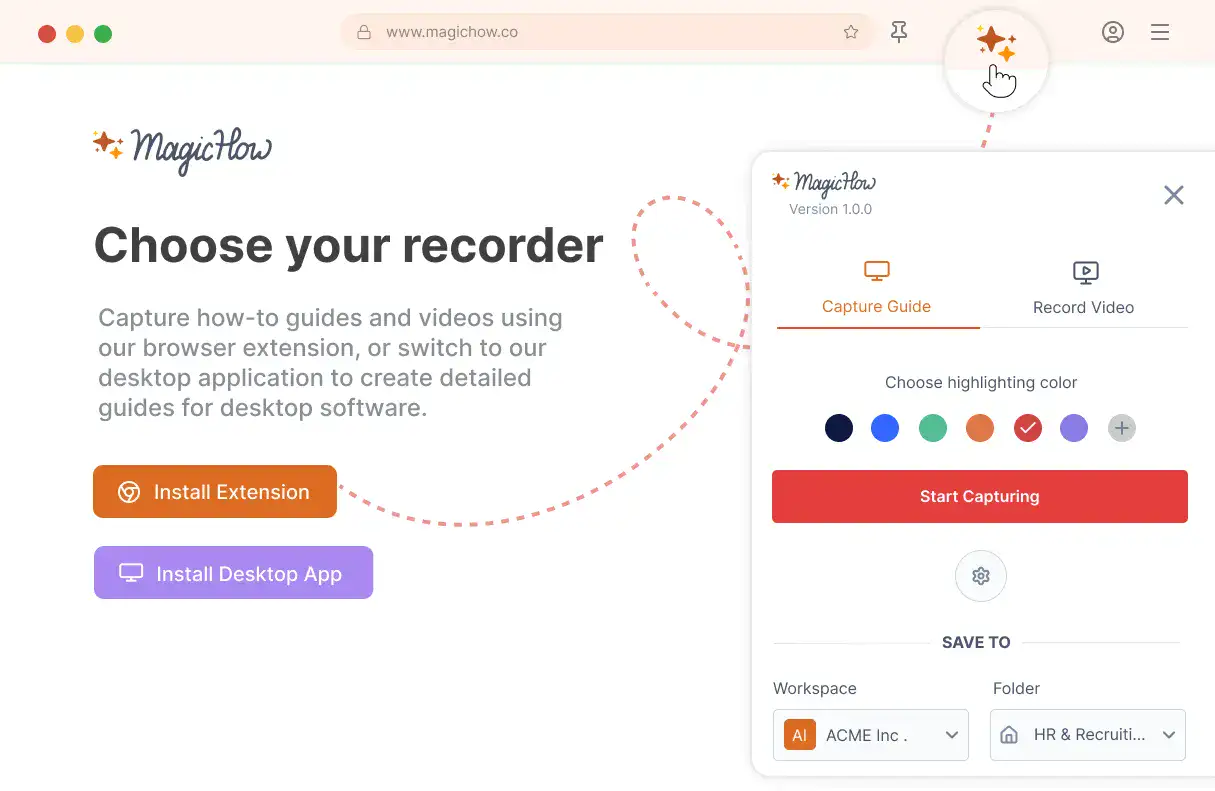
Install MagicHow
Install MagicHow in your browser or on your desktop to start capturing processes across any software in minutes.
- Works in your browser
- Works on desktop (Mac & Windows)
- Works across any software
- Fast, simple, accurate
- Ready in minutes
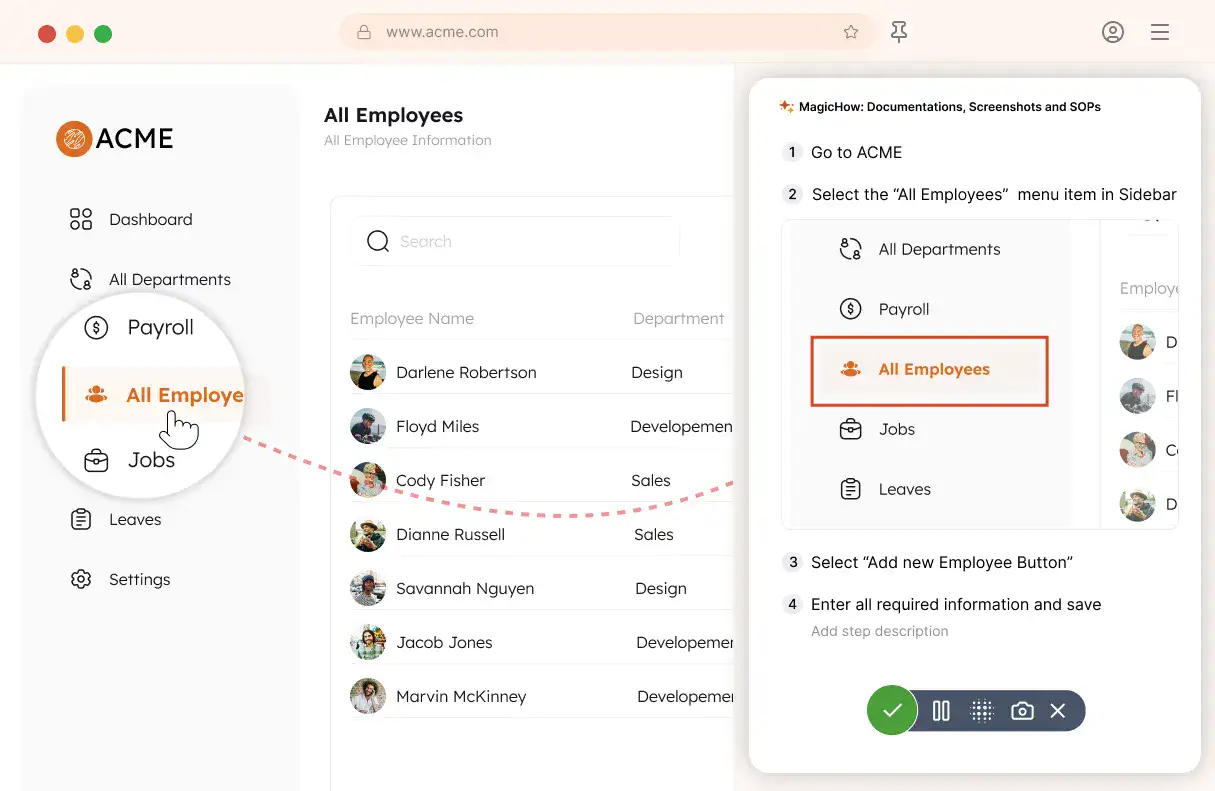
Capture your process
Turn everyday work into documentation by capturing your process as you complete it.
- Creating guides while working
- Record any software process
- Turn actions into steps
- No manual writing needed
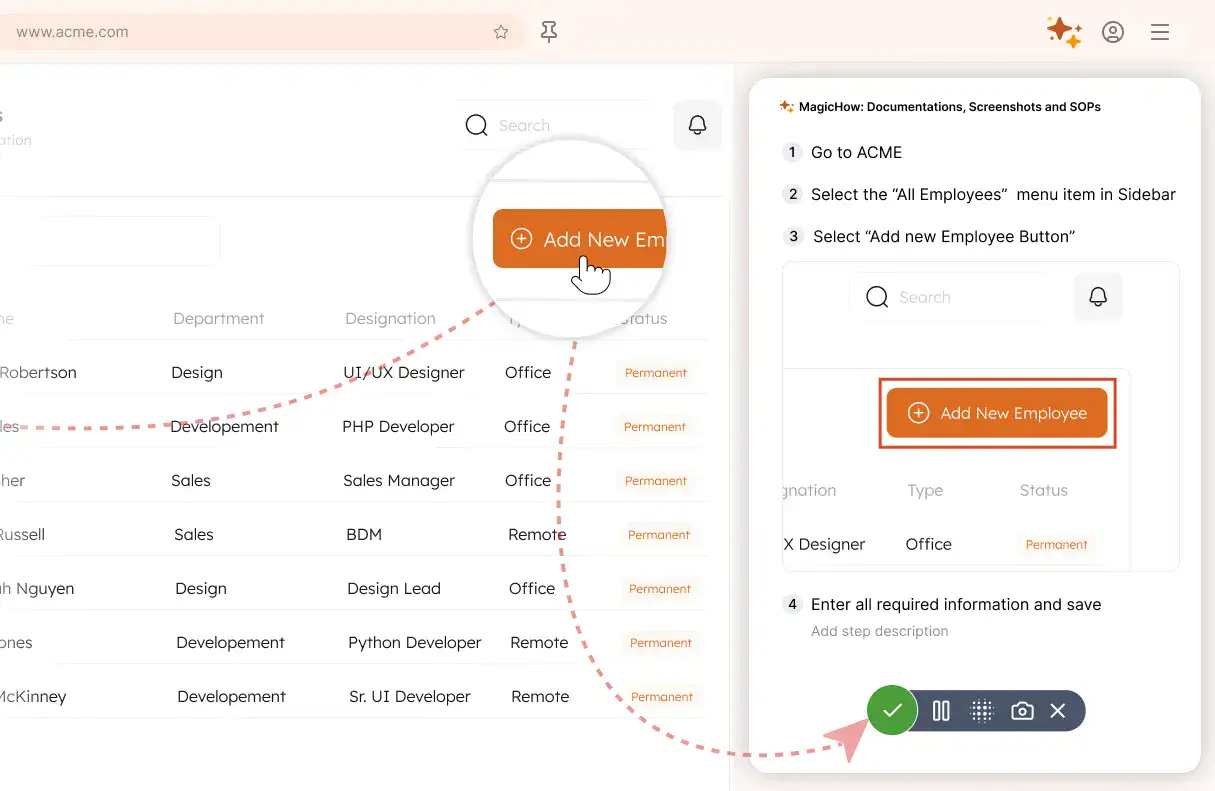
Save your capture
Save your recording, and MagicHow generates a clean, complete step-by-step guide from your actions.
- Turns actions into instructions
- Clean step-by-step output
- No steps missed
- One capture becomes documentation
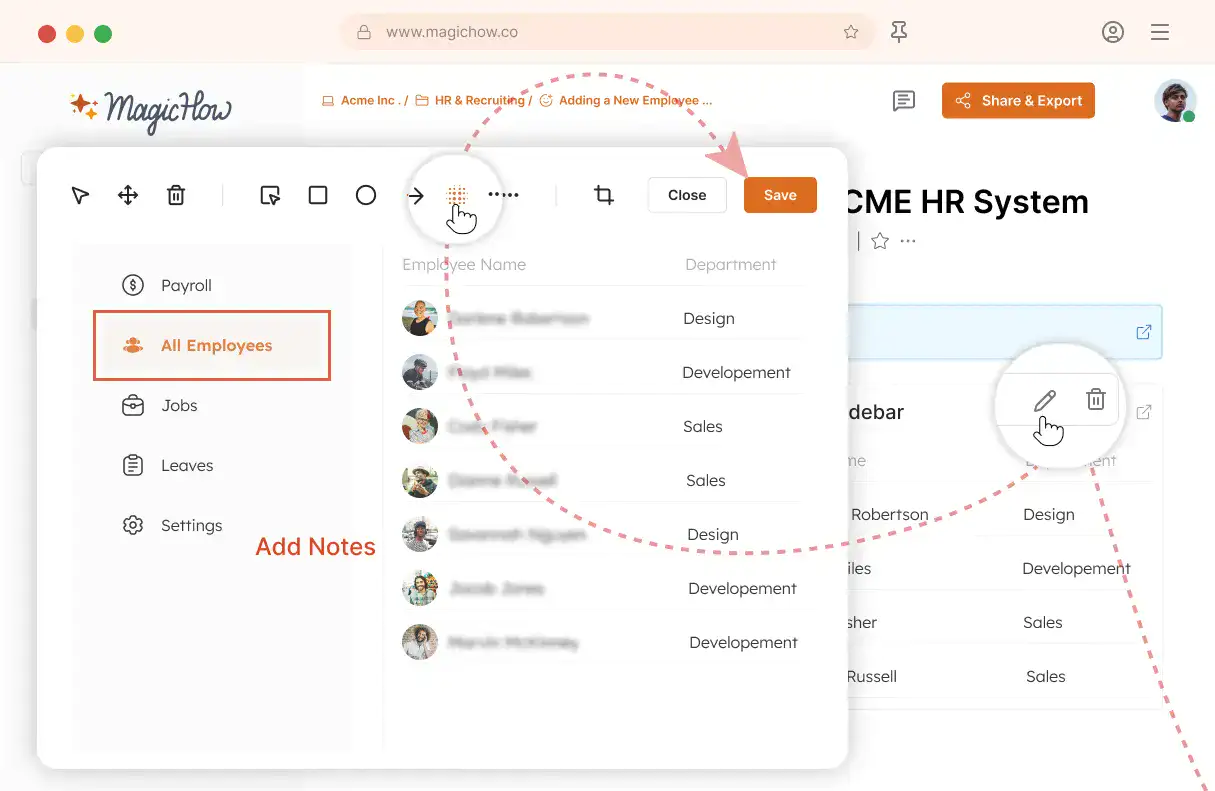
Edit and customize
Quickly improve your guide with edits, AI polishing, and rich content like notes, links, videos, and diagrams.
- Add notes and tips
- Blur sensitive information
- Polish guides in minutes with AI
- Insert links and resources
- Add videos and diagrams
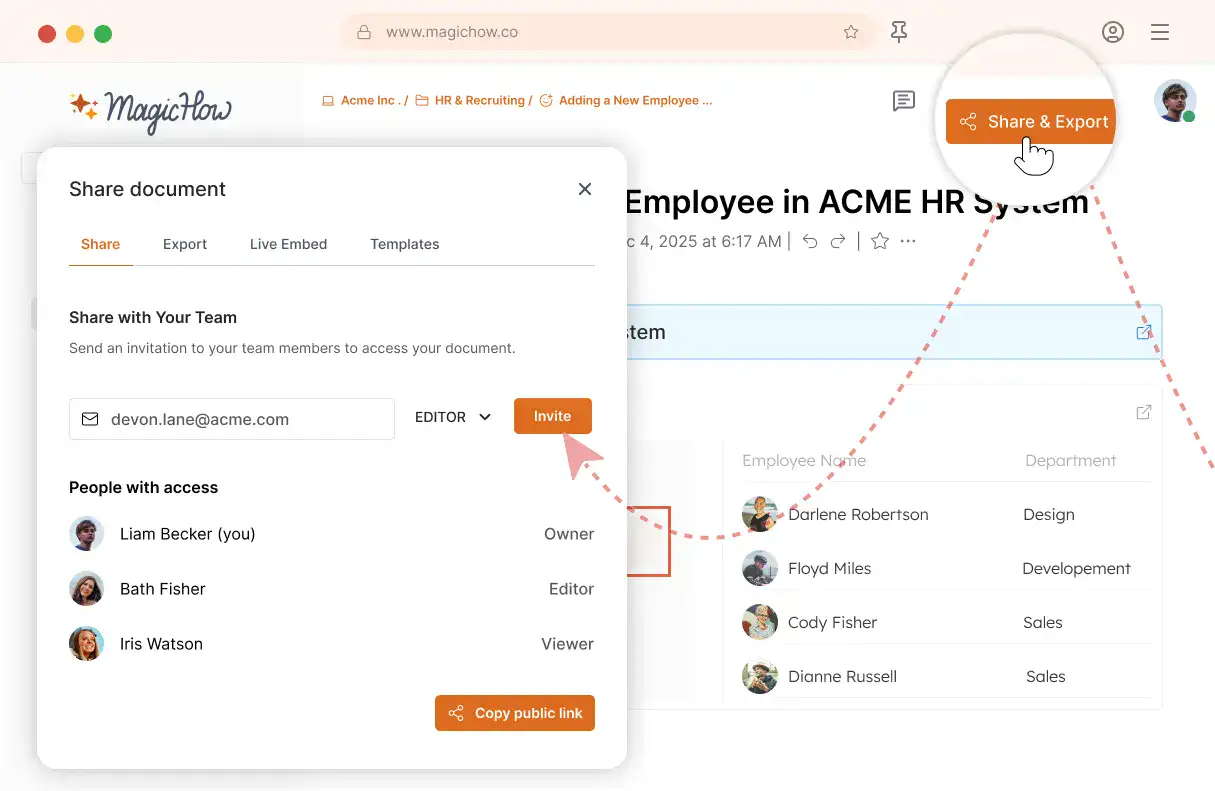
Share with your team
Share guides securely with your team, control access, embed in documentation, or export in multiple formats.
- Invite users to your workspace
- Keep knowledge centralized
- Send public access link
- Export PDF, Word, Markdown
- Control access rights
- Embed in your documentation
Automate the Creation of How-to Guides and Customer Manuals
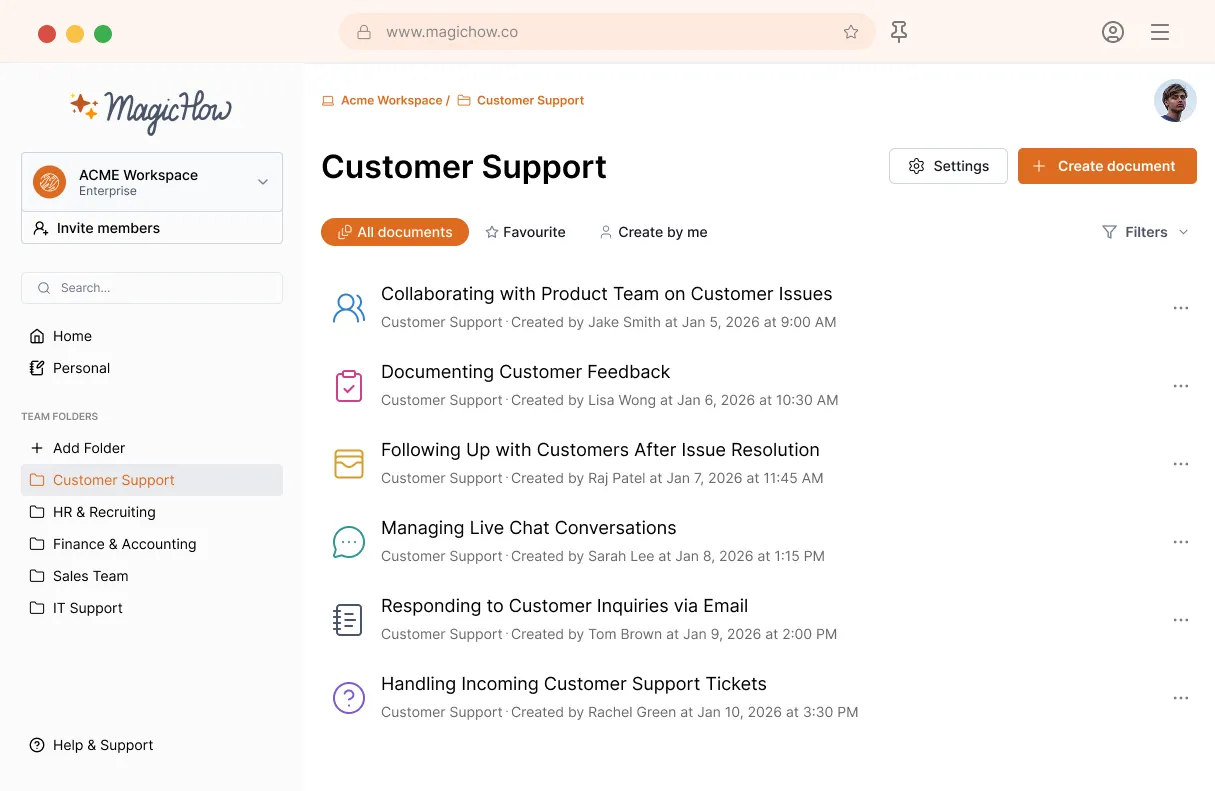
MagicHow for Modern Support teams
MagicHow helps customer support teams document FAQs. Record real support processes and turn them into visual step-by-step guides that customers and agents can use to resolve questions faster.
Get StartedUse MagicHow in the Largest Number of Industries
E-commerce
Healthcare
Education
Entertainment
Tourism
Information Technology
Transportation
MagicHow's Advantages for Customer Support
Save your time and energy by creating a single how-to guide or manual for thousands of customers. Use MagicHow to create training materials for your customer support managers.
Process Standardization
By creating instructions, you put everything in its place. Your customer support team follows processes in the most logical and productive way, adhering to fixed standards of service quality.
Automation
With MagicHow, you can forget about taking screenshots multiple times in a row. The tool will automatically create a guide, following your every step, recording it, and compiling slides into a comprehensive guiding document.
Errors Reduction
Since the key processes connected with using software and digital document workflow are standardized, your employees make fewer mistakes and tackle the tasks faster and more efficiently.
Performance Growth
By providing your employees with robust instructions, you help them focus on more creative tasks, some of which are vital for the company’s development. Besides, detailed guides leave less room for distraction.
Empower Your Client Relations Managers With Clear and Visual Instructions
Got Questions?
If you can't find what you're looking for, get in touch.
How to Make a Customer Service SOP With MagicHow?
You can use MagicHow in the process of making SOPs in those parts of documentation which are connected with using the software. Considering that a considerable volume of the customer support team's work requires software, MagicHow can be a helpful tool for creating step-by-step guides for a wide variety of tasks. With MagicHow, you can make detailed, visual, and concise guides for using the following types of software common for customer support departments:
help desk software;
customer relationship management (CRM) software;
live chat software;
ticketing systems;
knowledge base software;
call center software;
analytics and reporting tools;
remote support software;
collaboration and communication tools.
If you expect your customer service managers to have mastery of using all these tools, you should empower your employees with manuals on how to deal with software. These manuals can be part of SOPs or used independently. You may need step-by-step guides while onboarding your new hires. In addition, detailed manuals will help your customer care team handle their everyday tasks and keep the high quality of your company’s services. With MagicHow, you can create step-by-step guides of any complexity automatically, quickly, and easily.
How to Use Step-by-step Guides Made With MagicHow in Customer Support Services?
There are two ways of using guides, instructions, and manuals created with MagicHow, to enhance customer support teams' performance. Here are two groups of opportunities:
To train customer service managers and guide them in handling their everyday tasks. With detailed instructions on using software, managers can respond quickly to requests and provide clients with accurate answers. By having a competent approach to remote support tools, managers can assist clients in troubleshooting their difficulties remotely, thereby increasing customer loyalty and retention levels.
To create a knowledgebase for clients, consisting of step-by-step guides and answers to frequently asked questions in the form of instructions and manuals. By creating such a knowledgebase, you empower your users with a tool for solving the issues on the spot without wasting time and effort on seeking assistance. Moreover, by sharing with clients basic knowledge on how to use your services, you can reduce the number of requests to the tech support department.
With MagicHow, you can create how-to guides for both purposes. The tool gives you an opportunity to make instructions or manuals automatically with minimal effort. MagicHow records the process, breaking it down into steps, and compiles it into a comprehensive guiding document. You can then customize your guide to meet your target audience’s expectations.
How to Create Effective Step-by-step Guides for Customer Support With MagicHow?
With MagicHow, creating a how-to guide is simple and straightforward. The process includes the following steps:
launch the MagicHow browser extension or desktop version;
open a program or extension you want to describe;
start recording the process as soon as you start performing the actions;
follow all stages of the process at a comfortable pace;
stop recording;
go to the MagicHow dashboard to see the result and add details.
Then, edit a guide by replacing or adding screenshots, writing comments, adding tips, and graphic elements. You can also customize your guide’s style by varying colors and fonts.Finally, share your guide once it’s completed. To make your guides effective for a customer support team at large, you should align the logic of the entire set of guiding materials with the customer service team's performance. Once you have identified your team's processes and who is responsible for their performance, you can build a knowledge base tailored to your managers’ goals and challenges. With MagicHow, the practical part of this job - making guides itself - could be completed with minimal effort.
How Can I Share How-to Guides With Customer Support Managers and Clients?
There are several ways to deliver your step-by-step guides to client services managers and clients. MagicHow allows delivery to individual recipients and groups of people. You can choose the most convenient option from the following opportunities, depending on your goal:
download your guide as PDF to keep the content unchanged and openable on any device;
send a link to your recipients, modifying the access parameters - just like you would with Google Docs files;
save a document as HTML or a Markdown to paste it into a blog post or other publication on a third-party website;
embed a guide into your knowledge base, SOP, or user manual.
The particular combination of these methods ensures access flexibility. You can always deliver your documentation to a wide audience or, conversely, to narrow the list of recipients down to keep it private.
On Which Devices Can I Use MagicHow?
MagicHow is available on a desktop. There are two versions available: a browser and a desktop. The browser version is compatible with all popular browsers, including Chrome, Firefox, Edge, and Safari.The desktop version enables you to make guides for your desktop software. In addition, it can be used even when there is no Internet connection.
How Much Does It Cost to Use MagicHow for Customer Support Team’s Needs?
We aim to ensure that as many people as possible can benefit from our tool, saving time and effort when creating guides, tutorials, and instructions. That's why we offer the majority of features for free. However, to further enhance and improve our product, we have some paid features available at an affordable price. Your support allows us to continue developing and enhancing our tool for your benefit.