Faster Onboarding Starts With Clear Documentation
Capture everyday processes as they happen and turn them into clear, step-by-step guides for onboarding new hires.
Help New Hires Make a Strong Start
Provide your new teammates with the knowledge of how to use software tools that are key for handling a variety of daily tasks.
Filling the forms
Give new hires detailed instructions on how to fill in tax, benefits, and other forms on an onboarding site. Help new teammates go through formalities with ease.
Settling in
Introduce software tools to the new employees and help them become proficient in handling their digital workspace within a few hours.
Mastering New Software
As soon as a new software solution is implemented, share the guide on how to use it with your teammates so that they can work in sync.
Getting Answers to How-To Questions
Prepare answers to the FAQs in advance. Provide your freshly minted colleagues with information on typical solutions for common challenges.
Communicating
Help new hires to become skillful users of the company's communication channels to enhance coordination and boost productivity.
Build clear, step-by-step documentation for all your onboarding resources.
A Knowledge Base
Corporate Portal
Onboarding Portal
Create onboarding documentation in minutes
Capture your processes as they happen and turn them into clear, step-by-step guides and training manuals new hires can follow.
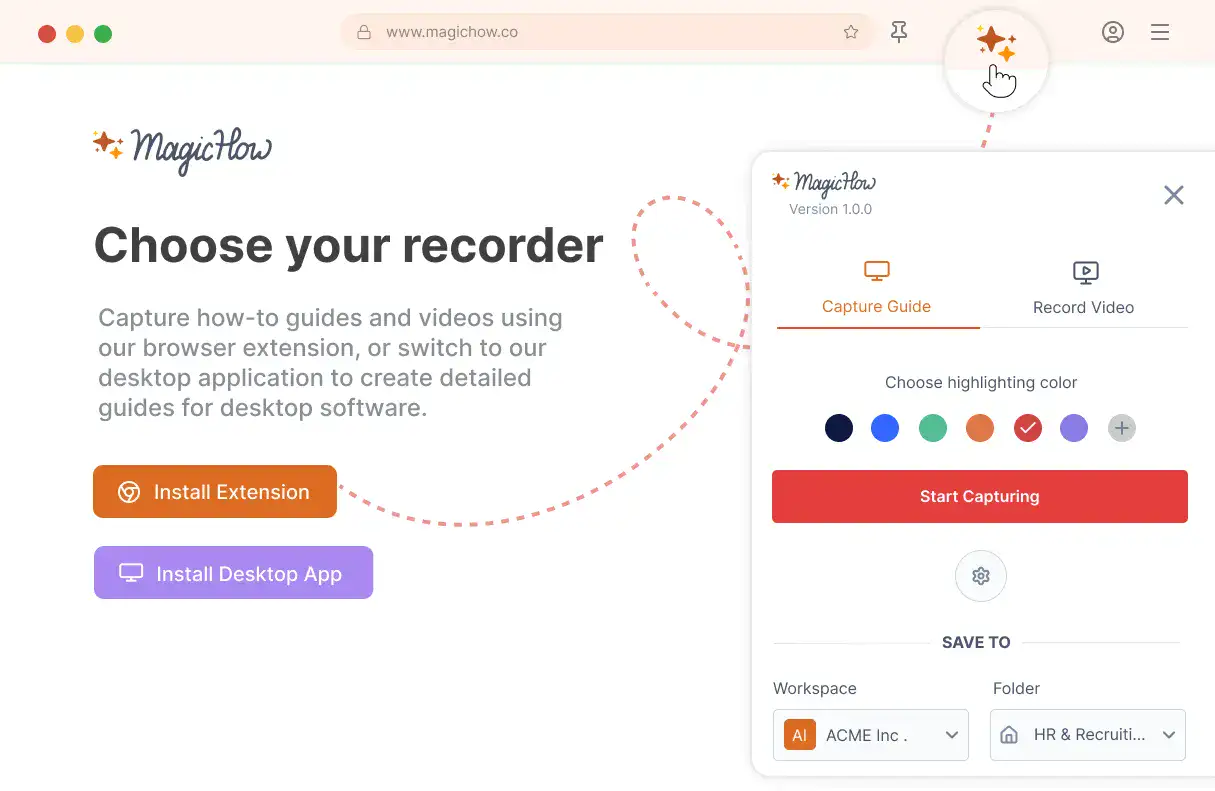
Install MagicHow
Install MagicHow in your browser or on your desktop to start capturing processes across any software in minutes.
- Works in your browser
- Works on desktop (Mac & Windows)
- Works across any software
- Fast, simple, accurate
- Ready in minutes
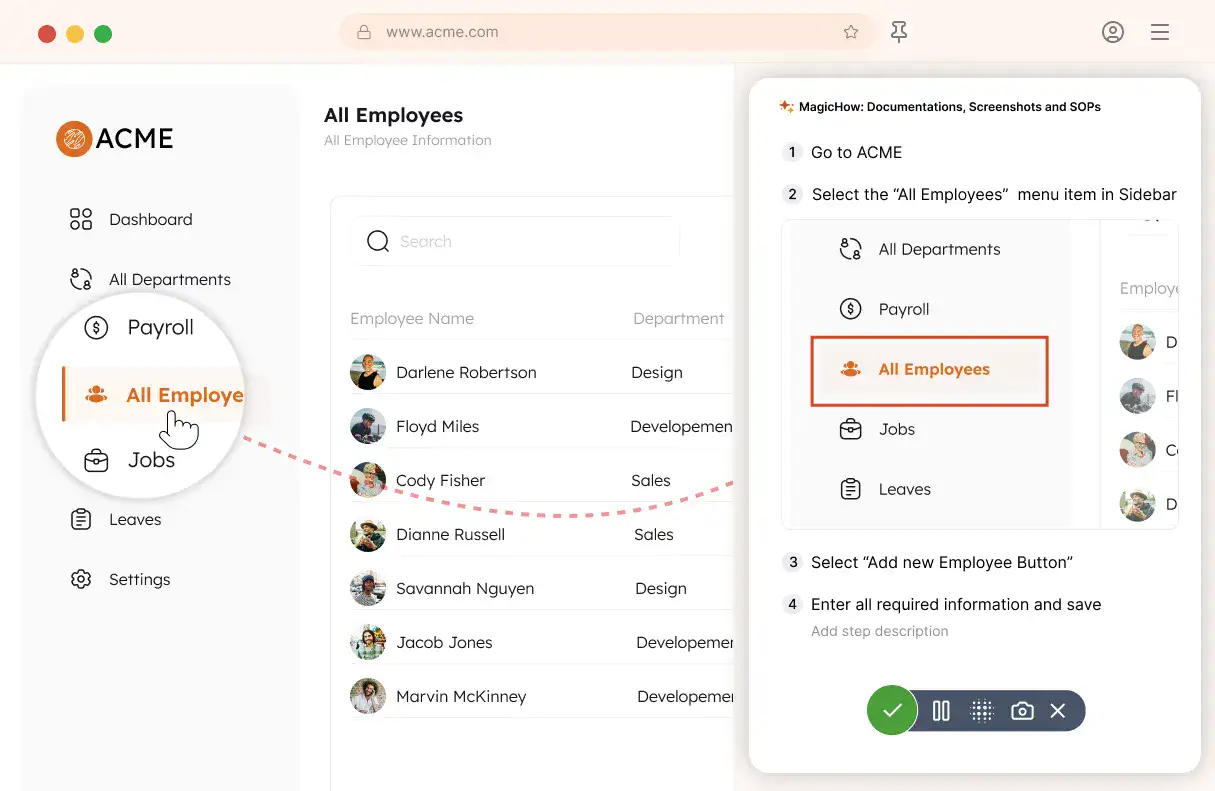
Capture your process
Turn everyday work into documentation by capturing your process as you complete it.
- Creating guides while working
- Record any software process
- Turn actions into steps
- No manual writing needed
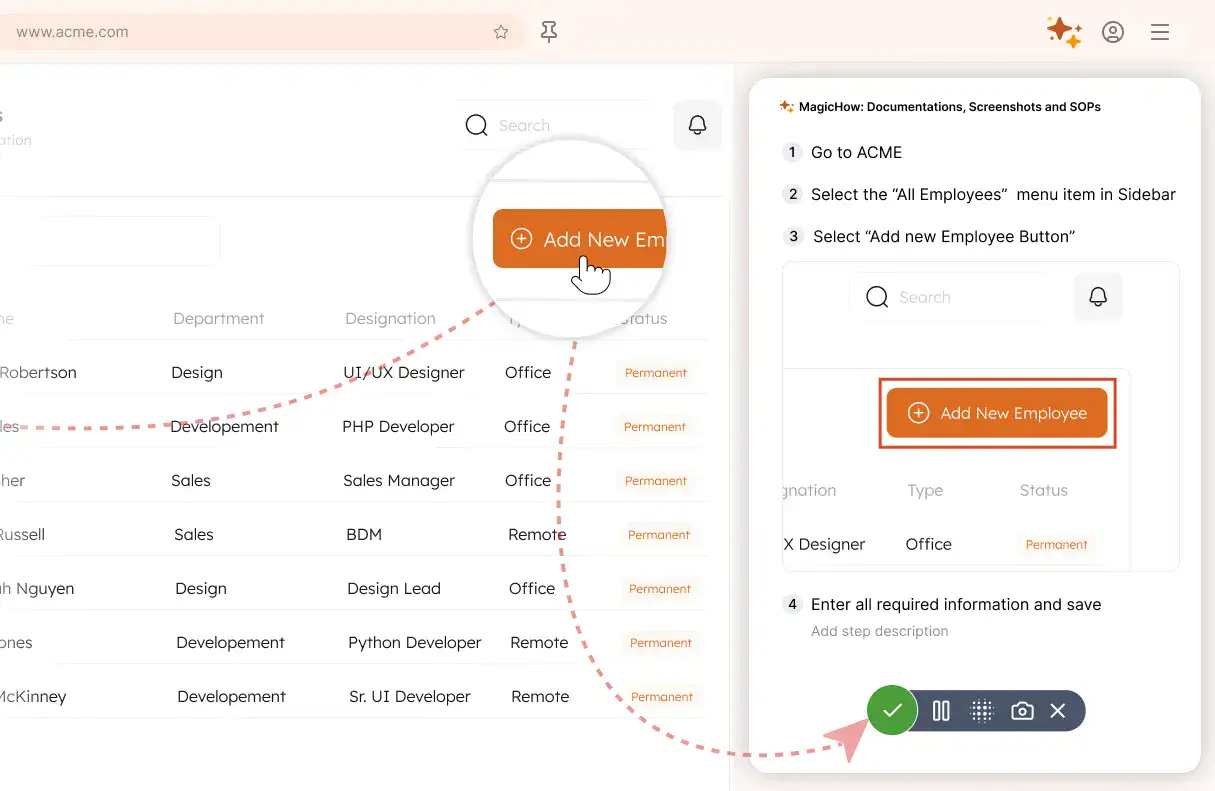
Save your capture
Save your recording, and MagicHow generates a clean, complete step-by-step guide from your actions.
- Turns actions into instructions
- Clean step-by-step output
- No steps missed
- One capture becomes documentation
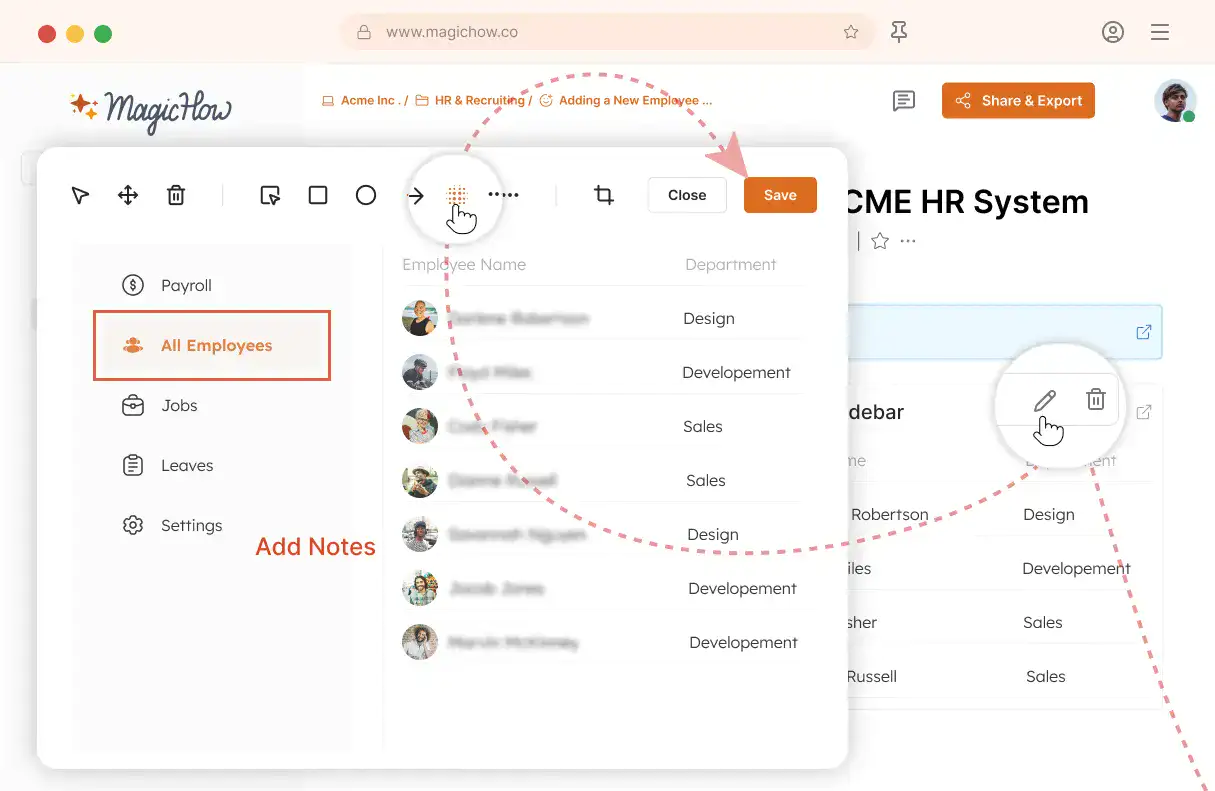
Edit and customize
Quickly improve your guide with edits, AI polishing, and rich content like notes, links, videos, and diagrams.
- Add notes and tips
- Blur sensitive information
- Polish guides in minutes with AI
- Insert links and resources
- Add videos and diagrams
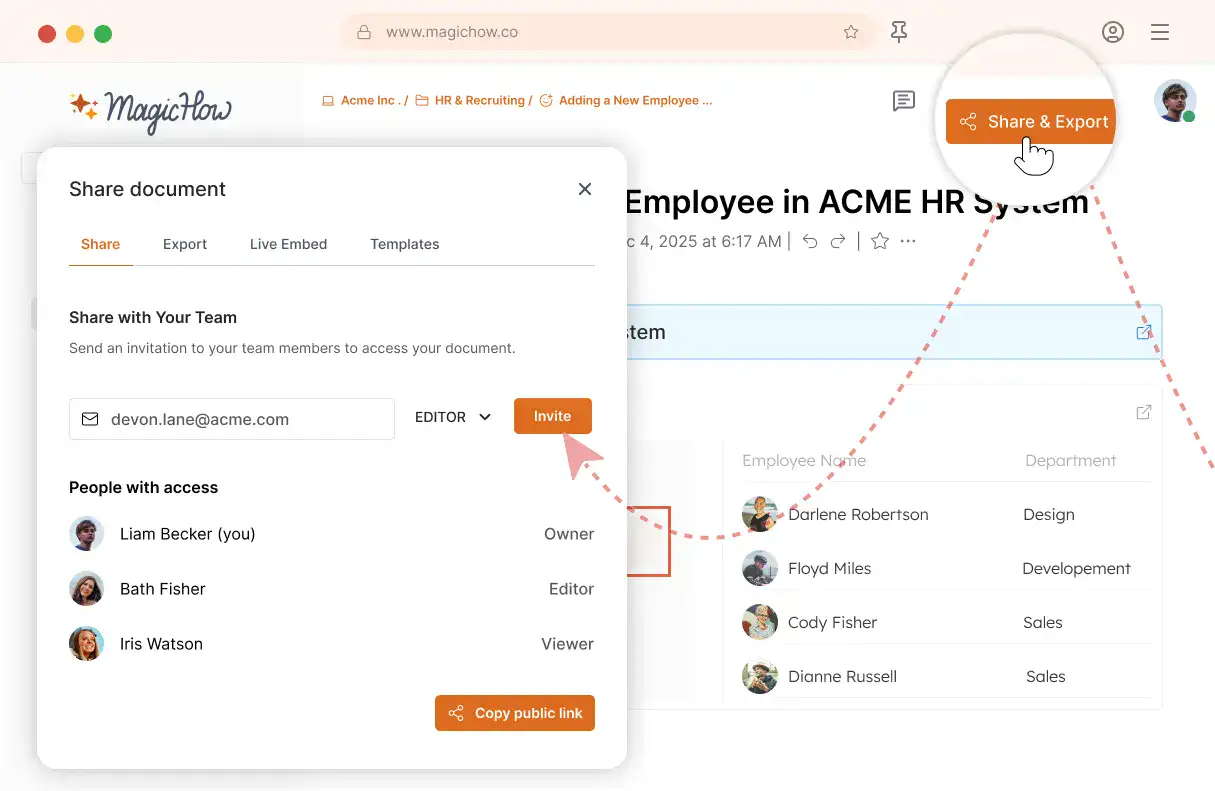
Share with your team
Share guides securely with your team, control access, embed in documentation, or export in multiple formats.
- Invite users to your workspace
- Keep knowledge centralized
- Send public access link
- Export PDF, Word, Markdown
- Control access rights
- Embed in your documentation
Get Clear Benefits for Your Company from Organizing Instructions With MagicHow
Clear, visual SOPs and step-by-step instructions help new hires become productive faster. They reduce confusion, improve consistency, and keep onboarding smooth and motivating.
More engagement
Having a concise how-to guide in place means that you can inch your way toward a goal, being aware of what you do and why you do so. You stay enthusiastic, feel elated after success, and are eager to contribute more.
Fewer errors
Process standardization lowers the risk of misconceptions and confusion, which can lead to errors. Due to straightforward and consistent guidance, specialists are less prone to missteps and hasty decisions.
Higher retention rate
Clear and detailed tutorials help new employees achieve success easier and maintain a sense of progress, keeping the level of confidence high. Hence, specialists are more motivated to stay in situ and move to higher positions inside a company.
Higher productivity
Empower your employees with an opportunity to complete more tasks in less time by following your tutorials. You can reasonably expect a team's productivity boost since, with detailed instructions, specialists can hit their goals effectively.
More space for development
Following your clear, concise, and visually rich step-by-step instructions, employees can streamline routine tasks and focus on strategic goals. Procedure standardization provides space for exploring brand-new approaches and promoting innovation.
Keep Your Team Productive and Save Hours of Training Time.
Got Questions?
If you can't find what you're looking for, get in touch.
How Can I Create a Good How-to Guide for New Hires With MagicHow?
All you need to make a guide, tutorial, or instruction is to walk in your new hires' shoes, go through the entire process you’re going to describe, and reflect the process’ logic as a number of steps on your slides.
For example, you need to create a step-by-step tutorial on how to use a corporate project management tool. The primary task is to split a process into simple, easy-understandable, sequential steps. For a complex tool like project management software, you may need to create a multi-layered structure where some tasks have multiple subtasks. For example, you can breakdown a task on adding a task into four steps:
creating a task;
defining deadlines;
setting a priority level;
assigning a task to a particular team member.
When you build such a chain of steps and back up your structure with screenshots, your material becomes a comprehensive, visual, and easy-to-follow manual, saving your new teammates plenty of time and effort.
With MagicHow, you can create a how-to guide by recording your own steps while performing a task. You click the recording button and go through the task creation procedure. Then, you add titles and annotations to your screenshots, put a logo, blur personal information, and make other retoolings to make your guide well-rounded. Finally, you share your instructions with new hires by sending them a link, downloading your guide, or embedding it on the onboarding portal.
The time required to create a guide for newcomers depends on the topic. For example, creating a manual for booking a meeting room can take five minutes. To compose an instruction on using the CRM, you may obviously need more time.
How Can I Edit My How-to Guide for New Hires?
There are several features developed for adjusting a guide to your goals and your target audience’s expectations. You can optimize your manuals and tutorials quickly and easily by using simple in-built tools. In MagicHow, you can make the following modifications:
crop a picture, focusing the user’s attention on particular blocks, buttons, forms, or other objects;
add titles and annotations to your slides, providing extra information;
blur sensitive data to adhere to ethics and compliance standards;
insert logos to the slides to brand a document;
change your guide’s style to make it more relevant to your company’s image and to provide emotional emphasis.
You can amend your slides either during your recording session or after it’s finished. As a final step, you can share, download, or embed your step-by-step manual.
Can I Use MagicHow in the Browser or as a Desktop Tool?
Both options are available to provide you with maximum opportunities. A browser version is compatible with the following browsers:
Chrome;
Firefox;
Edge;
Safari.
A desktop version is also at your service, allowing you to create how-to guides without relying on an internet connection and giving you greater control over the software's performance.
How Can I Deliver My Instructions for New Hires Made With MagicHow?
You have several options to make your tutorials, manuals, and instructions accessible for your new team members. Here is the list of opportunities:
sharing via a link, varying the access parameters;
exporting in PDF;
copying a guide as HTML or Markdown;
embedding a document in such popular tools as Notion or Confluence.
Be attentive and avoid confusion between embedding a guide and inserting it as a Markdown. Use the first option if it’s vital to update your instructions on the third-party websites according to the latest changes in the original document.
How Much Does It Cost to Use MagicHow?
We want our tool to be accessible to as many people as possible so that they can save time and effort in creating guides, tutorials, and instructions. Therefore, the majority of our features are available for free. However, some advanced features are expected to be paid for, but the price is more than affordable. The premium subscription allows us to invest in improving our product for you.