Process Documentation, Built in Real Time
Just do the work. MagicHow captures every step and turns your workflows into polished, shareable guides.
Let MagicHow Handle your Documentation
Create how-to guides, standard operating procedures (SOPs), training manuals, and step-by-step instructions while you focus on your work.
Training Your Team
Whether it’s new or existing software, your team should use it with confidence and speed. Clear documentation helps teammates learn faster, work effectively, and master the tools they rely on every day.
Training Your Customers
Provide your dear customers with clear, easy-to-perceive, visually attractive guides to help them benefit the most from your software products. Customers' comfort affects your ROI, so hit the bullseye on the first shot.
Onboarding Your Talents
Help new hires settle in quickly in their digital working environment by providing them with tutorials: brief, illustrated, and easy to grasp. Reduce time and effort spent on onboarding.
Making SOPs
Say goodbye to the production line of copypasting work while creating tons of Standard Operating Procedures. MagicHow will record each step you make and compile screenshots into a well-rounded how-to guide.
Answering how-to questions
Instead of participating in innumerable ask&answer sessions, create a comprehensive guide once and share the link whenever you deal with inquisitive colleagues, customers, and trainees. Get the most out of communication by getting rid of the routine.
Use Automated How-to Guides in a Vast Variety of Industries
Human Resources
Customer Support
Information Technology
Education
Healthcare
E-commerce
Create SOPs and Process Documentation in Five Steps
With MagicHow, you can create instructional documentation by simply following the process yourself, while our extension captures every step and compiles the content in a well-rounded document.
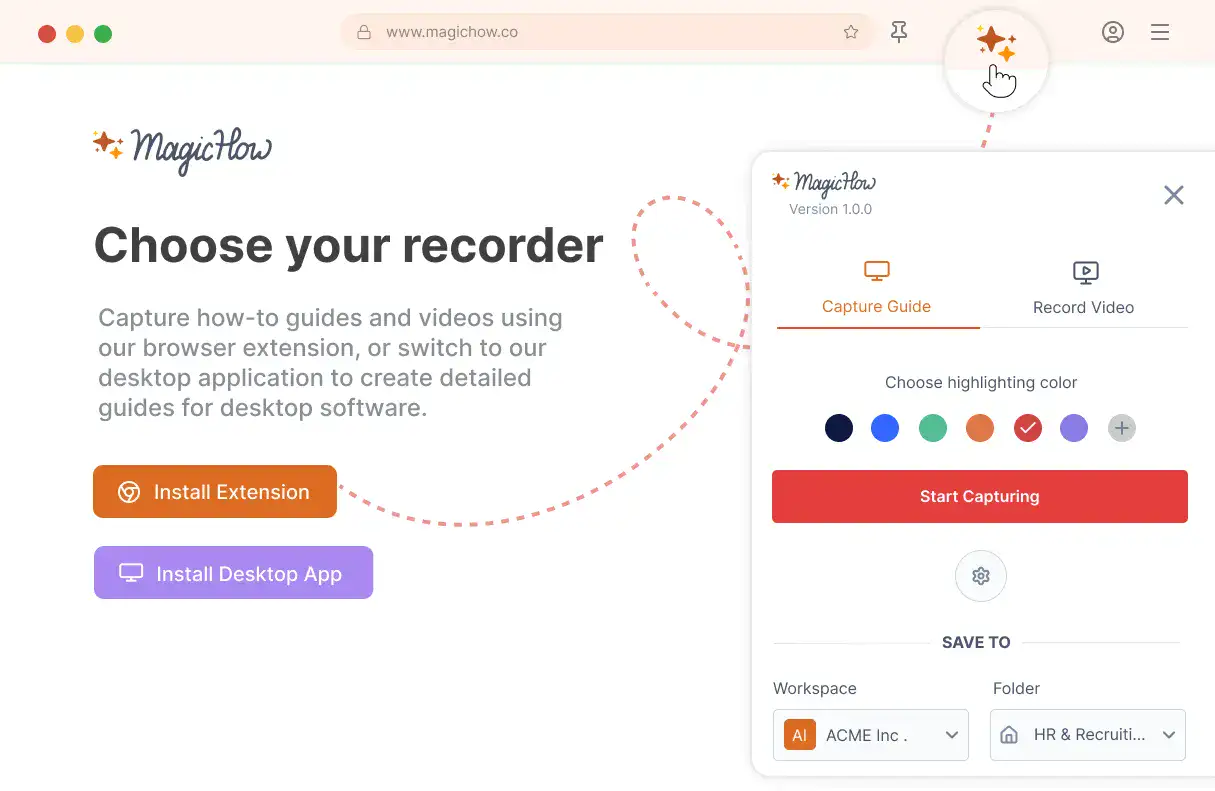
Install MagicHow
Install MagicHow in your browser or on your desktop to start capturing processes across any software in minutes.
- Works in your browser
- Works on desktop (Mac & Windows)
- Works across any software
- Fast, simple, accurate
- Ready in minutes
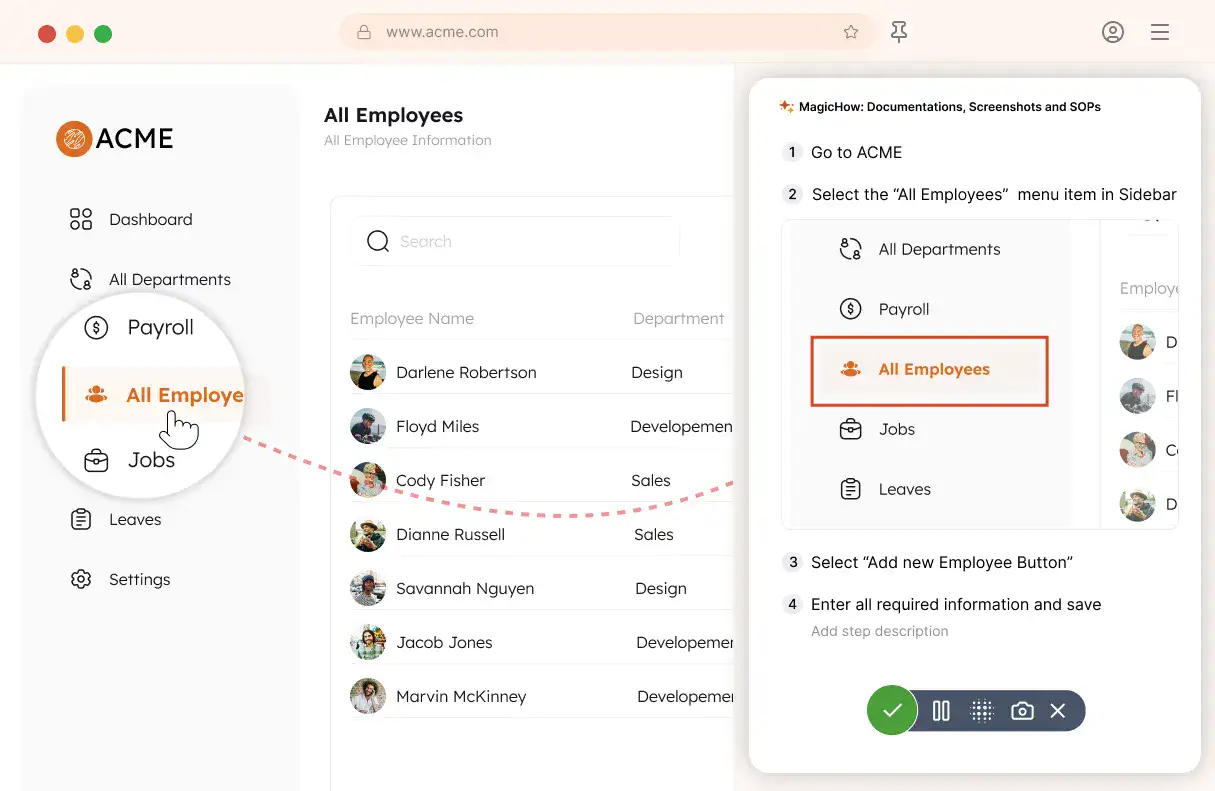
Capture your process
Turn everyday work into documentation by capturing your process as you complete it.
- Creating guides while working
- Record any software process
- Turn actions into steps
- No manual writing needed
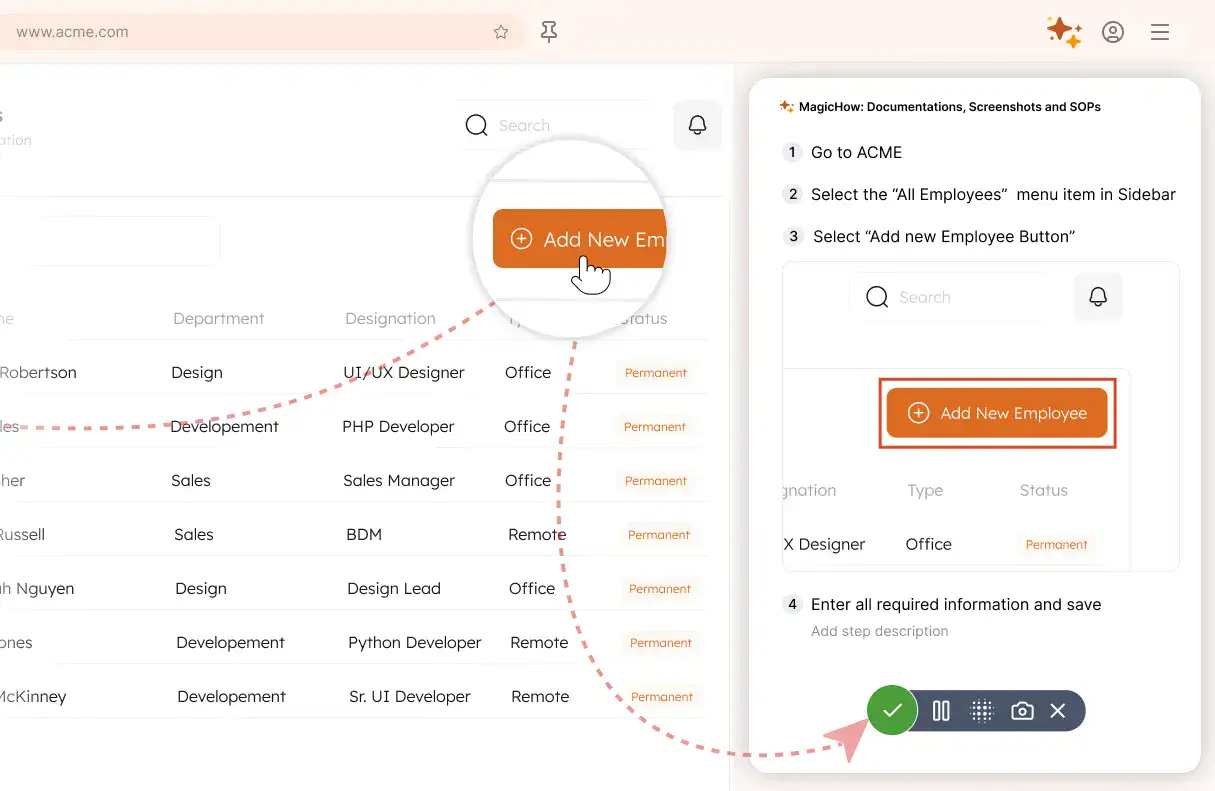
Save your capture
Save your recording, and MagicHow generates a clean, complete step-by-step guide from your actions.
- Turns actions into instructions
- Clean step-by-step output
- No steps missed
- One capture becomes documentation
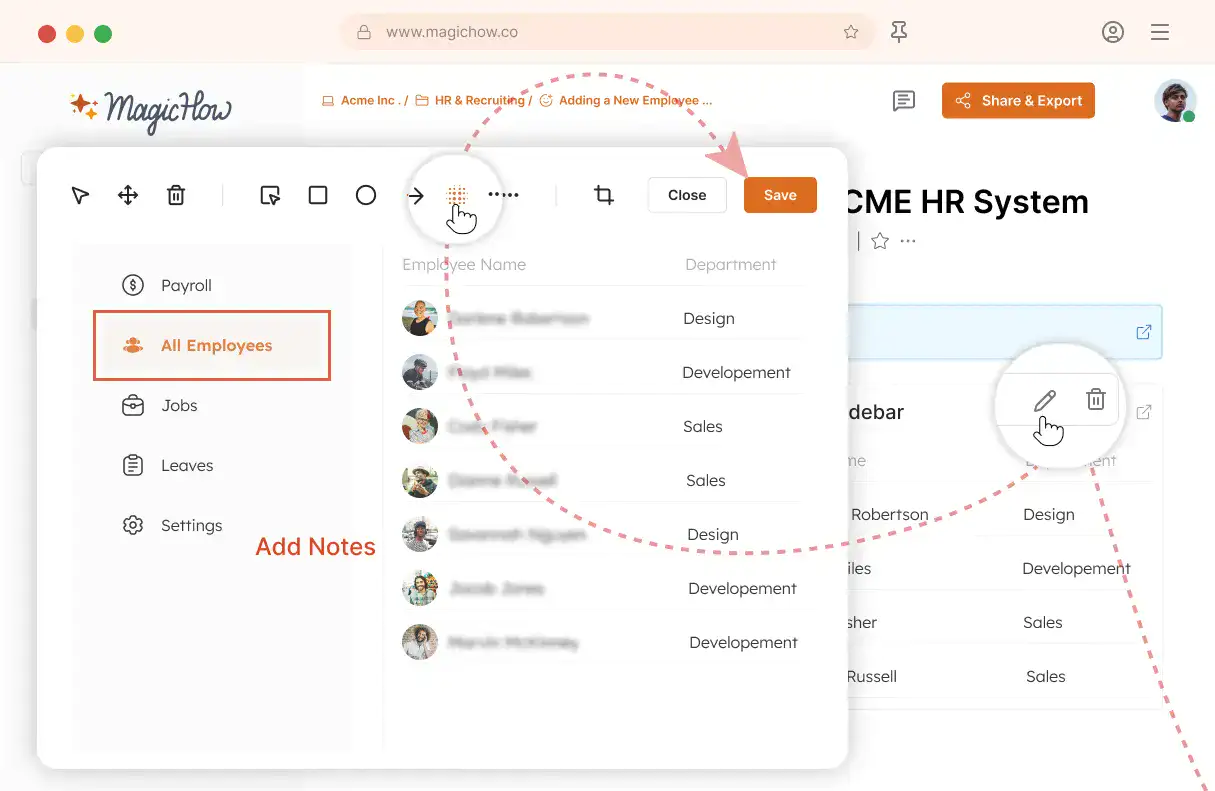
Edit and customize
Quickly improve your guide with edits, AI polishing, and rich content like notes, links, videos, and diagrams.
- Add notes and tips
- Blur sensitive information
- Polish guides in minutes with AI
- Insert links and resources
- Add videos and diagrams
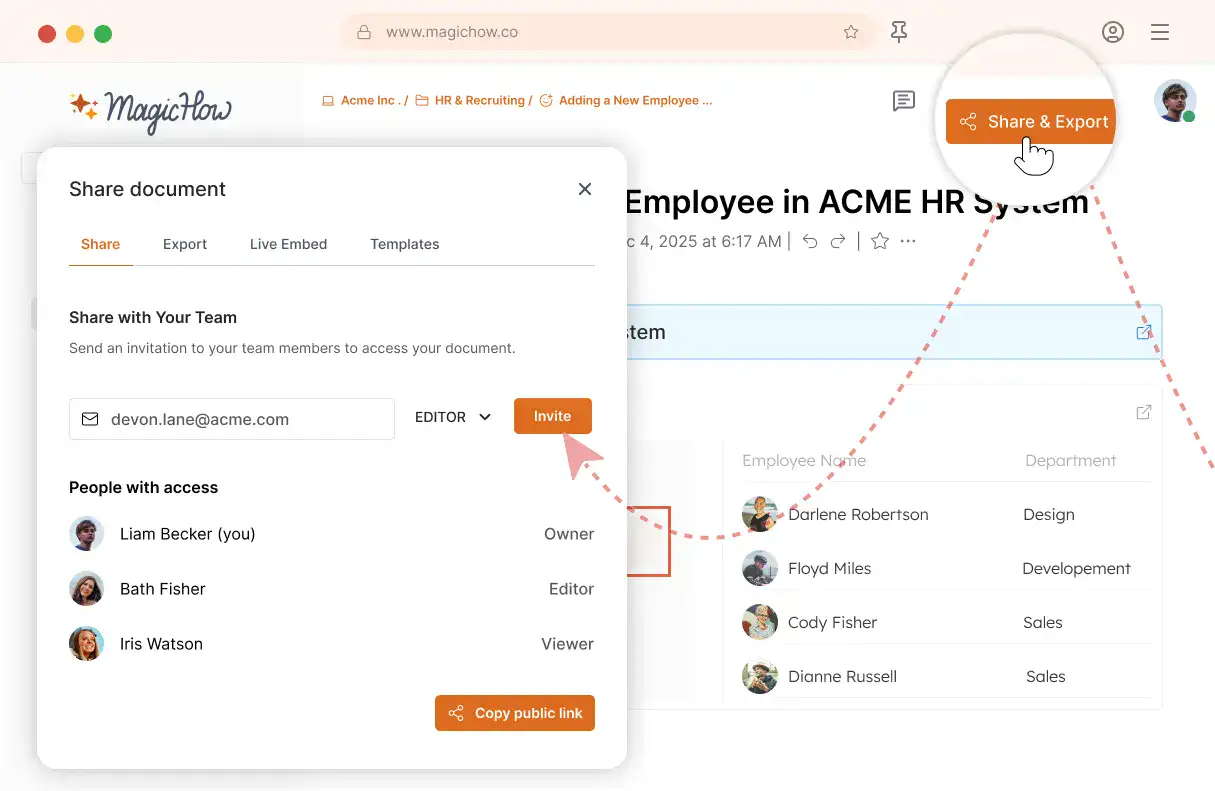
Share with your team
Share guides securely with your team, control access, embed in documentation, or export in multiple formats.
- Invite users to your workspace
- Keep knowledge centralized
- Send public access link
- Export PDF, Word, Markdown
- Control access rights
- Embed in your documentation
Saved time
With MagicHow, you can easily follow one of the basic software development principles - DRY (Don't Repeat Yourself). Create one instruction and share it with as many recipients as you need, diverting your time to more important and creative tasks than emailing.
Higher performance
By shifting your priorities to strategic, creative, and expertise-demanding tasks, in contrast to repetitive actions, you can bring more value to the business. With MagicHow, you can get greater output from your time and effort investments.
Process standardization
Ensure synchronization of team members' efforts in reaching business goals. Provide standards throughout processes in which software is involved for performance optimization. Reduce the number of errors and delays in daily routine.
Fast onboarding
Concise and comfortable onboarding - whether it's the integration of new hires or customers into a company or service - incentivizes a higher retention rate. MagicHow provides your employees and customers with a flatter learning curve, ensuring loyalty.
Higher motivation
More creativity in dealing with everyday tasks entails higher engagement: it's way more inspiring to search for insights than make screenshots for several hours in a row. Do yourself a favor and let MagicHow automate the process of making step-by-step guides.
Create Instructions and Guides in Minutes
Got Questions?
If you can't find what you're looking for, get in touch.
How Can I Optimize Process Documentation With MagicHow?
With MagicHow, you can create how-to guides, instructions, manuals, and other guiding documents automatically. You can use our tool while performing a task you describe, and MagicHow will grab your every step, turning steps into slides and compiling slides into a comprehensive guide. You can customize your document later on, adding annotations, tips, and alerts, using graphic elements to anchor users' attention to particular details such as buttons or menus.Using MagicHow allows you to create a guide for a particular process once and share it with a wide audience with a couple of steps. Our tool provides updating your guides, embedded or shared by links, when you change an original document. To finalize, using MagicHow allows automation of process documentation, providing such benefits as the creation of concise, illustrated step-by-step guides and their customization. In turn, guides' creators benefit from saving time and reducing the amount of routine.
How Can I Create a Step-by-step Guide With MagicHow?
You can create a how-to guide, manual, instruction, tutorial, or any other guiding documentation by performing a process yourself, while a program catches every step and pictures it. MagicHow's job results in the creation of a detailed guide of the process. Later, a document can be customized by adding comments, tips, and graphic elements to emphasize specific issues. The process of guide creation is automated, which provides a creator with such an advantage as saving time and effort. To create a how-to guide with MagicHow, one doesn't need any specific skills. Reading a short manual is enough to make a first instruction. You can even skip this onboarding step and start with practice. An intuitive interface makes it possible to make a document and share it with a target audience from scratch without any prior knowledge of a tool. For the creation of a simple guide, you may need several minutes. In case you need to compose a more complex document, more time may be required.
How Can I Customize My How-to Guide Made With MagicHow?
Several features are available to make your guide or instruction clear, emphatic, and engaging. The basic job is done by a tool automatically: you just record the process, and MagicTool compiles the slides into a guide. What makes it holistic are your annotations and other details, which can be added using our tool’s features:
Slides’ titles;
Comments, tips, and alerts;
Graphic elements, such as arrows, rectangles, and others, which help emphasize on the important details.
In addition, you can play with your guide’s style by changing colors and adding logos. You can add details right after recording a process or later, at any time. When you share your document via a link or embed it, your recipients see the updated version as soon as you change the original document.
On Which Devices Can I Use MagicHow?
You can use MagicHow on your desktop computer or a laptop. There are two versions available: browser and desktop. Thus, you can make guides based on the software you use in your browsers or computer. A browser version is compatible with the following browsers:
Chrome;
Firefox;
Edge;
Safari.
A desktop version empowers you with an opportunity to work on your guides without an Internet connection.
How Can I Deliver My Process Documentation Made With MagicHow?
There are several ways to share your content made with our tool. Depending on the goal, you can use the following options:
download a document as PDF - suits best if you’d prefer your recipient get a copy, compatible with any device and operating system, safe to use and share since it’s unchangeable;
share a link - the only possible for further cooperative work on the document; perfect for providing a differentiated access;
copy as HTML or a Markdown - allows to use a guide on a third-party website, keeping the formatting of the document intact;
embed a guide into a blog or any other web page - a great opportunity to widen the target audience and promote your expertise.
Feel free to choose the most convenient option for every guide or instruction made with MagicHow.
How Much Does It Cost to Use MagicHow for Process Documentation?
A compulsory set of features needed for the creation of a well-rounded step-by-step guide can be used for free. The basic tool's version, available for free accounts, has enough power to tackle the major tasks such as capturing each step of the process, compiling the visual material to a detailed guide, and sharing it with colleagues, trainees, friends - anyone who needs guidance. A paid version gives slightly more opportunities to users. What is more important, it allows us to develop our product so that MagicHow could provide you with even more helpful capabilities.