Build an internal knowledge base without manual work
Document processes as they happen, turn them into clear guides, and organize everything in one place your team can rely on every day.
Hit Several Goals With One Tool
Create, organize, and maintain SOPs, training manuals, and internal guides in one place. MagicHow helps you document how work gets done and keep all internal knowledge structured, accessible, and easy to update as processes change.
Onboard New Hires
Provide your employees with instructions and tutorials on immersing themselves in operational processes. Keep your teammates' productivity high.
Answer FAQ
Give common answers to typical questions, avoiding hours going down the drain while you multiply the same information for similar responses.
Implement New Tools
Train your employees and customers to use new tools effectively. Help your audience feel like a fish in water with your software, keeping productivity and motivation high.
Provide Troubleshooting
Let your team members and clients feel confident while dealing with your tools and products. Empower them with an opportunity to troubleshoot using their own expertise.
Create Standard Operating Procedures (SOPs)
Build your internal knowledge base with clear, visual Standard Operating Procedures (SOPs) that help your team work faster and reduce mistakes.
Synchronize Processes
Provide your team with instructions to help your employees work faster, avoiding delays, task duplication, and promoting efficient collaboration.
Create Several Instructional Materials for Your Knowledge Base
Instructions
Standard Operational Procedures (SOPs)
Tutorials
How-to Articles
Frequently Asked Questions (FAQ)
Troubleshooting Guides
Training Materials
Create Your Internal Knowledge Base with Instructional Documentation
Create an internal knowledge base with how-to guides and step-by-step instructions that show how your processes work. Simply go through the process once while MagicHow records it and turns it into clear documentation your whole team can use.
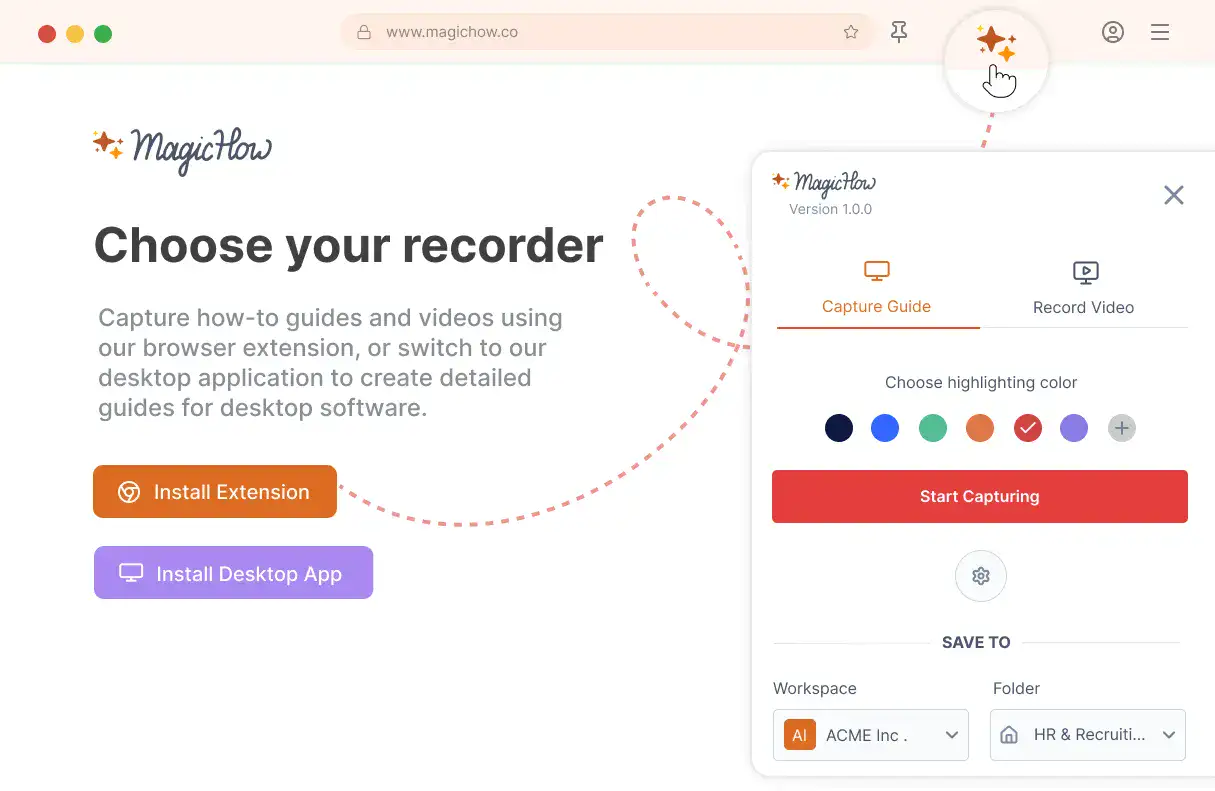
Install MagicHow
Install MagicHow in your browser or on your desktop to start capturing processes across any software in minutes.
- Works in your browser
- Works on desktop (Mac & Windows)
- Works across any software
- Fast, simple, accurate
- Ready in minutes
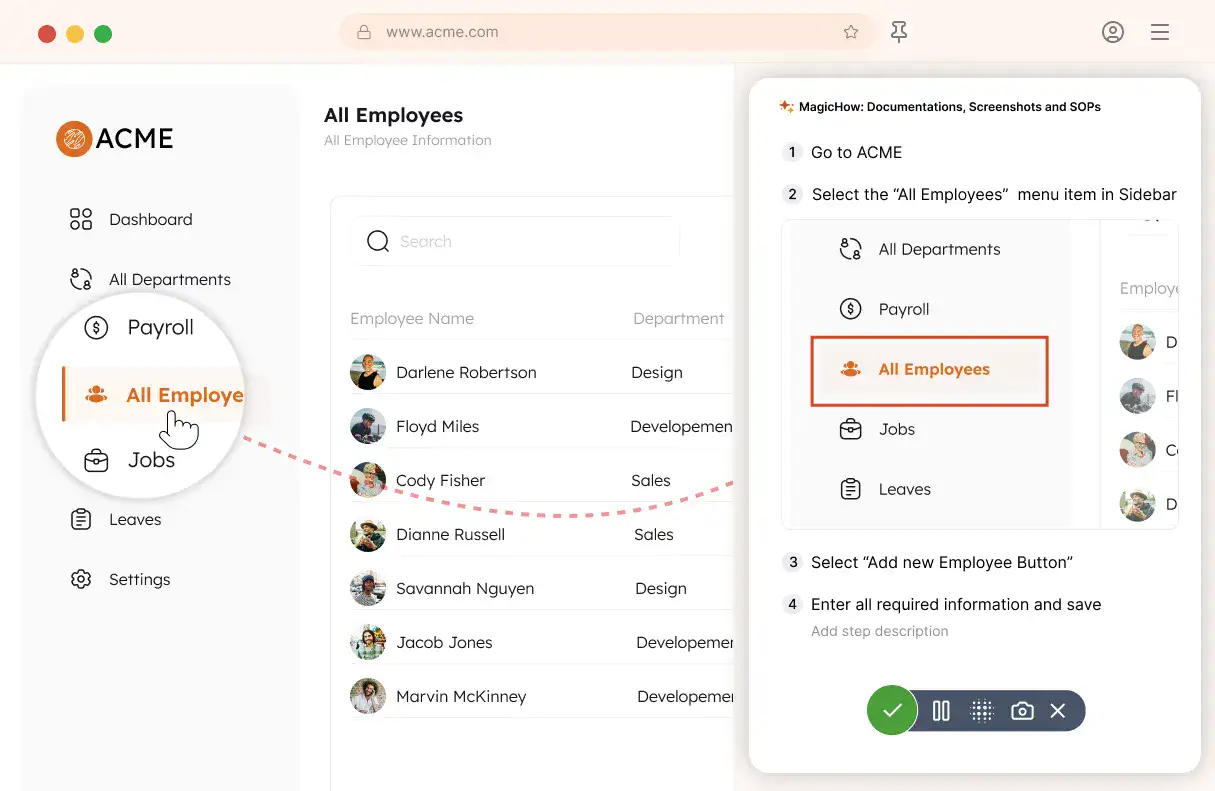
Capture your process
Turn everyday work into documentation by capturing your process as you complete it.
- Creating guides while working
- Record any software process
- Turn actions into steps
- No manual writing needed
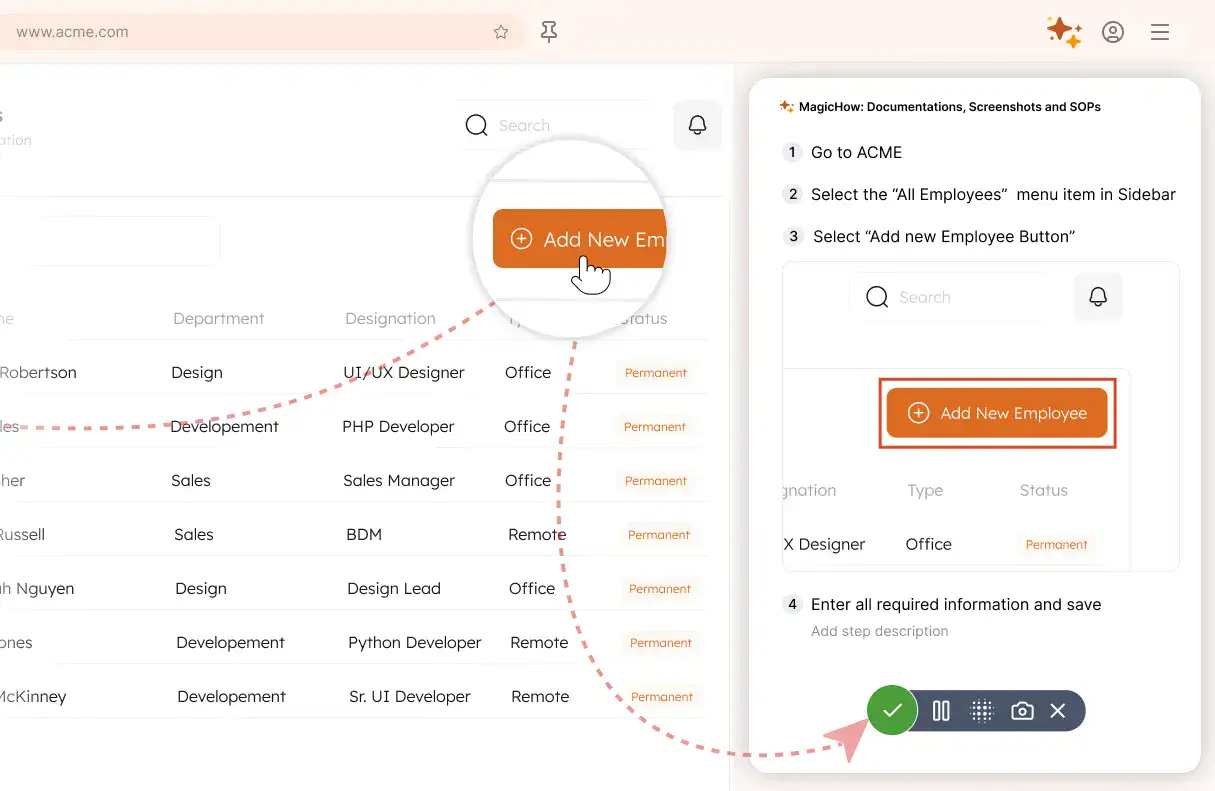
Save your capture
Save your recording, and MagicHow generates a clean, complete step-by-step guide from your actions.
- Turns actions into instructions
- Clean step-by-step output
- No steps missed
- One capture becomes documentation
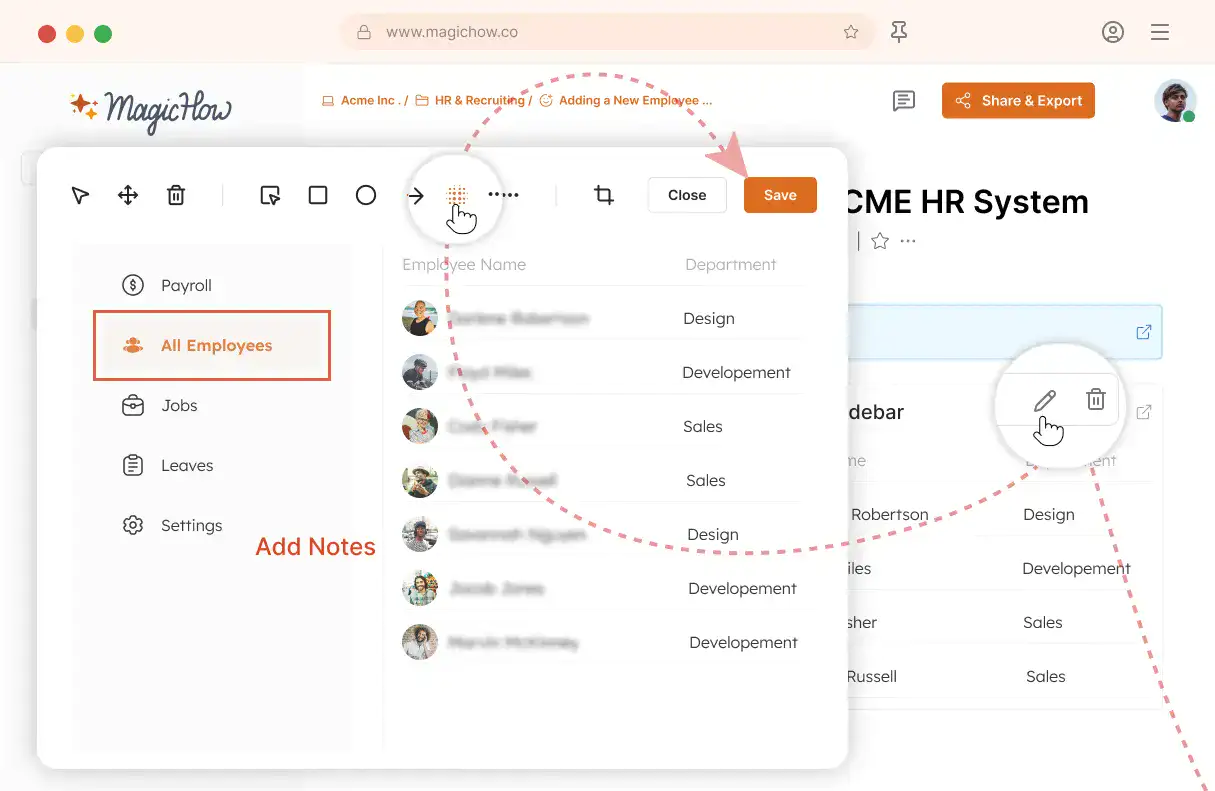
Edit and customize
Quickly improve your guide with edits, AI polishing, and rich content like notes, links, videos, and diagrams.
- Add notes and tips
- Blur sensitive information
- Polish guides in minutes with AI
- Insert links and resources
- Add videos and diagrams
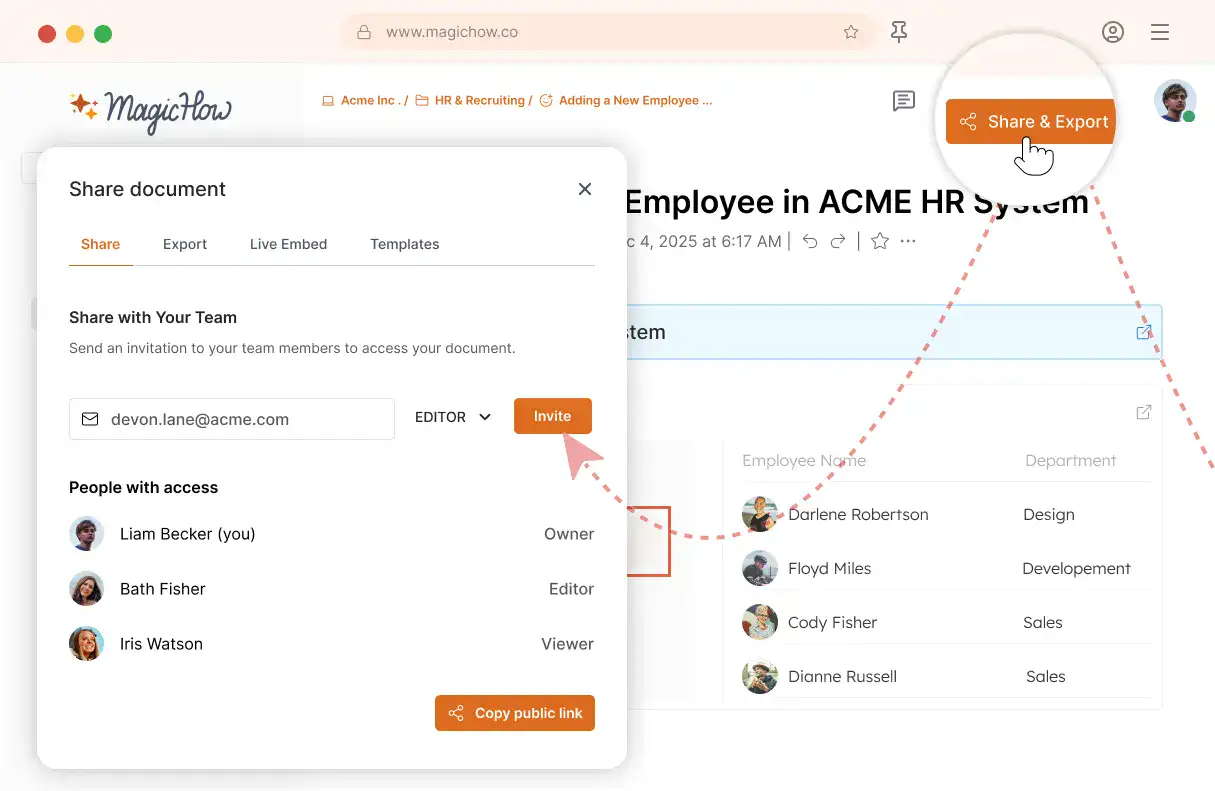
Share with your team
Share guides securely with your team, control access, embed in documentation, or export in multiple formats.
- Invite users to your workspace
- Keep knowledge centralized
- Send public access link
- Export PDF, Word, Markdown
- Control access rights
- Embed in your documentation
Turn Your Knowledge Base into a Productivity Tool
Document processes with visual step-by-step instructions and training manuals that are easier to follow and quicker to update than text-heavy documentation.
Knowledge Flow Optimization
With guides made with MagicHow, you can scale up your knowledge fast, covering a vast range of topics, and share tutorials easily. Trainees will always be up to date on instructional materials amendments, without any additional move on your part.
Flexible Access
Control access to your internal knowledge based on your needs. Manage roles and permissions (RBAC) to give employees the right level of access to guides and documentation. Share content on your terms, and let your team access the MagicHow internal knowledge base directly from the browser extension while they work without switching context.
Visualization
With MagicHow, you don't need to write piles of text to provide guidance for your readers. Create a visual instruction, clear and engaging, which your audience will use to immerse deeply into the topic. Make such an instruction automatically.
Customization
All your guides can be tailored to align with your company's documentation standards and brand's features. After recording the process you're describing, you can add comments and tips, place logos on the screenshots, and modify your guide's visual style.
Create an Internal Knowledge Base That Answers Your Team’s Questions
Got Questions?
If you can't find what you're looking for, get in touch.
How to Make a Knowledge Base Using MagicHow?
MagicHow is a helpful tool for creating instructions, manuals, SOPs, tutorials, and FAQs, which are the key parts of a knowledge base. The domain of MagicHow’s expertise is using the software. When you need to build a guide on using your software tools – project management systems, content management systems (CMS), customer relationship management systems (CRM), e-commerce platforms, chats, messengers – you can do it with MagicHow. You don’t need to make screenshots or record videos. Any skills in design are required.To make a guide that will become a part of your knowledge base, you need to perform a task you want to describe, following the process step by step. MagicHow will record the process, breaking it down into logical steps. As soon as an action is finished, a tool will assemble automatically made screenshots into a concise and comprehensive step-by-step guide.You can use MagicHow for creating content which is included in the following elements of a knowledge base:
tutorials;
troubleshooting articles;
manuals;
SOPs;
case studies;
training materials.
Building instructional content is automated; hence, your attention isn’t distracted by the need to build a guide’s structure or manage the recording pace. However, you can easily tailor a document to your audience’s expectations. For example, you can change pre-written screenshots’ titles, add and remove screenshots, add comments and tips, add logos, and change your guide’s visual style.
How to Write Standard Operating Procedures (SOPs) for a Knowledge Base With MagicHow?
You can use MagicHow to write SOPs associated with using the software. For example, if you need to write instructions on how to check the order status in a CRM for your customer support manager, you can utilize MagicHow to create a step-by-step manual on the topic. The guide will be generated automatically, requiring a minimum of your time and effort.Here are some other examples of SOPs you can create with MagicHow assistance:
how to troubleshoot failures in the payment process on a marketplace;
how to publish a post using CMS;
how to generate accounting reports with specialized cloud service;
how to create a new project in Jira;
how to collect sales data in a CRM.
These are just a few examples of tasks requiring SOPs for which a guide building will be helpful. With MagicHow, one can create a visual SOP that illustrates every step of the process - a detailed instruction that is easy to understand and share. To create such a guide, you need to follow the process by yourself. MagicHow will record every stage of the procedure and compile screenshots into a well-rounded instructional document. You can easily tweak an SOP afterward by changing the order of the steps, adding or removing screenshots, adding annotations, and changing your guides’ design.
How to Create a Knowledge Base for Employees Using MagicHow?
MagicHow allows you to create visual guides for several parts of a knowledge base, such as instructions, tutorials, FAQs, SOPs, and articles. When you need instructional documentation for software used in your company, MagicHow is an effective solution for creating such instructions: engaging, visual, and clear. You may need step-by-step guides for your knowledge base in two cases:
for onboarding;
for smooth implementation of the new tools.
While onboarding new hires, you can use MagicHow to help new teammates provide all necessary documentation through a corporate site. Guides are useful while new hires are getting acquainted with their working tools, such as systems for accounting, project management, paperwork, and others.When you implement new software to increase your company's performance, you need to inform all your employees about innovations. The most productive way to do this is through a knowledge base. MagicHow will help to create tutorials on using new software and share them with a whole team or particular departments.An expert in charge of creating a tutorial has one simple requirement: to go through the process after installing MagicHow, while the tool records each step. Once the recording is completed, the guide is ready.MagicHow works automatically; thus, for a guide creator, composing a manual isn't time-consuming. The document's author can edit a guide later on by adding comments, blurring sensitive information, adding screenshots, and adjusting the guide's visual style for corporate standards of branding.MagicHow offers a variety of opportunities to share your content with recipients. In the case of a knowledge base, embedding guides in SOPs, manuals, and articles may be considered optimal. A great advantage of this approach to sharing is the automated updating of all sets of documents if an author changes the original document.
How Can I Share SOPs, Tutorials, and other instructional documentation in MagicHow?
One of the primary purposes of a guide builder is to provide opportunities to share content easily, reaching out to a target audience and adjusting access settings to the recipients' roles. MagicHow is effective in both tasks: one can deliver content to the widest audience with a couple of clicks while regulating access opportunities at the same time.Here are the options for sharing documents made with MagicHow:
sending a link via email with flexible access settings depending on the recipient's status;
downloading as PDF;
saving as HTML or Markdown;
embedding to a third-party website.
Embedding is optimal for integrating a guide, SOP, or instruction into a knowledge base. The key advantage of this option is that changes in the original document are reflected in the embedded versions as soon as they are made. Use MagicHow to keep your audience engaged during operational processes with ease.
How to Embed Guides Made With MagicHow into a Knowledge Base?
To embed a how-to guide, an instruction, or an SOP into your knowledge base, choose the appropriate menu option. Once a piece of code is copied, paste it into your knowledge base page. All formatting will be kept as you created it. When you make changes to the content, your audience sees the updated version of the document.
How Can I Customize How-to Guides in MagicHow?
MagicHow automatically creates instructional materials, taking on most of the responsibility for how the guide looks. Nevertheless, you can easily customize your documents, adjusting them to your target audience’s needs and preferences. There are several ways to edit your guides after the recording of the process is finished:
adding and deleting screenshots, replacing them;
amending screenshots’ titles;
adding comments, tips, and alerts;
blurring sensitive information;
adding graphic elements;
adding logos to the screenshots;
changing guides’ graphic style.
MagicHow allows you to tailor your instructions to your knowledge base logic and design. Giving your freedom of creativity, a guide builder does the most routine job of creating screenshots and compiling them into a comprehensive document to save you time and effort.
How Much Does It Cost to Use MagicHow?
Our goal is to make our tool widely accessible so that people can save time and effort when creating guides, tutorials, and instructions. That's why most of our features are available for free. However, for some advanced features, we do charge a fee. Nonetheless, our prices are more than reasonable. Opting for a premium subscription helps us invest in further improving our product for you.