Create SOPs & Guides for Every Sales Process and Tool
Turn your sales processes into visual, step-by-step guides as you work. Align how your team uses CRM, outreach, and deal tools to drive consistent execution and reduce repeated questions for managers.
Benefit from Guides Which Increase Your Sales Team's Performance
Boost sales team productivity with clear guides and manuals for key sales processes and tools.
Process Standardization
Your team members always know which algorithms to follow to provide prospects with information and services as quickly as possible.
Answers to FAQs
Empower your sales managers with the information required for troubleshooting any customers' issues. Let your sales professionals swing into action immediately.
Onboarding
With ready-made instructions under your belt, you can enhance your new hires’ competencies and tailor them to your business needs two times faster.
New Tools Implementation
Integrate new software into your sales process without a hitch. Empower your sales representatives with more effective tools, ensuring smooth and problem-free workflow.
Communication
Give your sales managers an opportunity to ping each other only when it's really necessary. Let them feel confident, having solid and clear instructions within reach.
Increased Empathy
When your sales talents have clear directions, they have time and energy to search for non-standard solutions based on discovering the clients' needs.
Create a Variety of Guiding Documents for Your Sales Team
Knowledge Base
Instructions
Standard Operating Procedures (SOPs)
Troubleshooting Guides
Step-By-Step Guides
Software Documentation
Document Sales Processes with MagicHow
MagicHow helps sales teams document sales processes and tools as they work. Create visual guides and training manuals that improve consistency, speed up execution, and keep everyone aligned as your team grows.
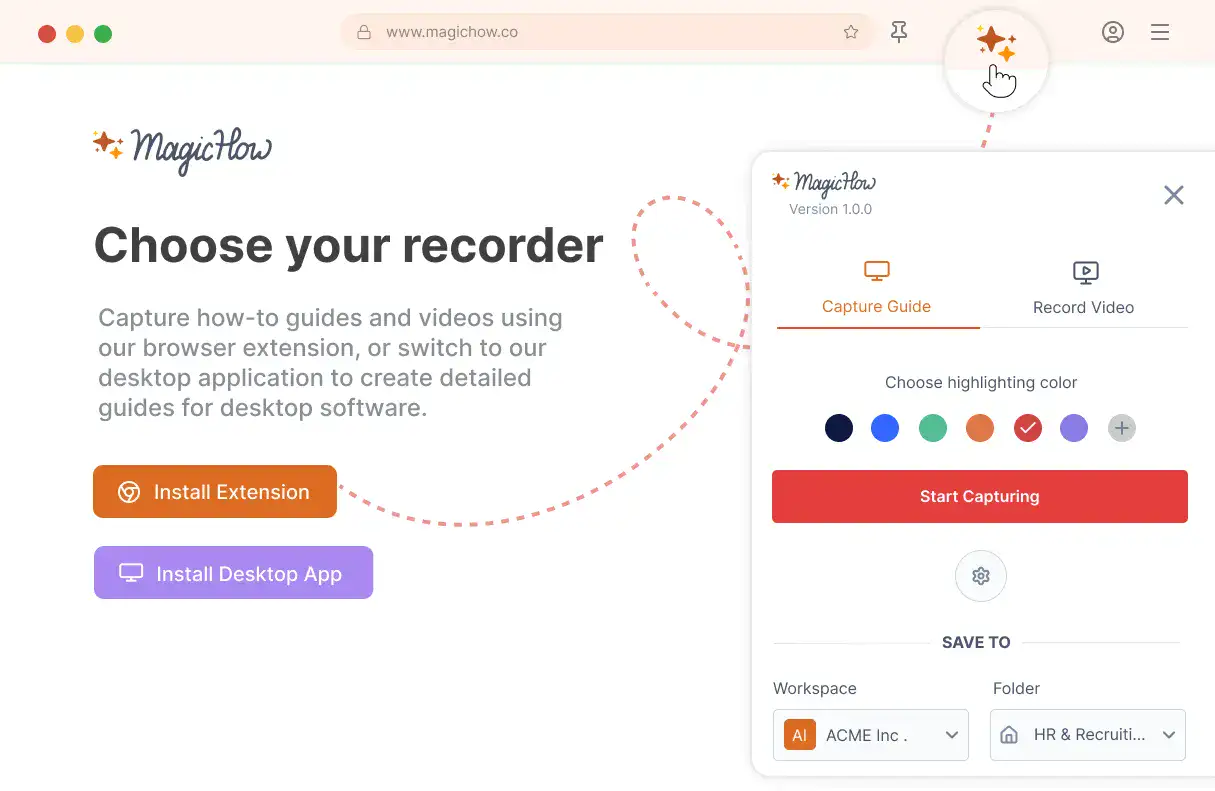
Install MagicHow
Install MagicHow in your browser or on your desktop to start capturing processes across any software in minutes.
- Works in your browser
- Works on desktop (Mac & Windows)
- Works across any software
- Fast, simple, accurate
- Ready in minutes
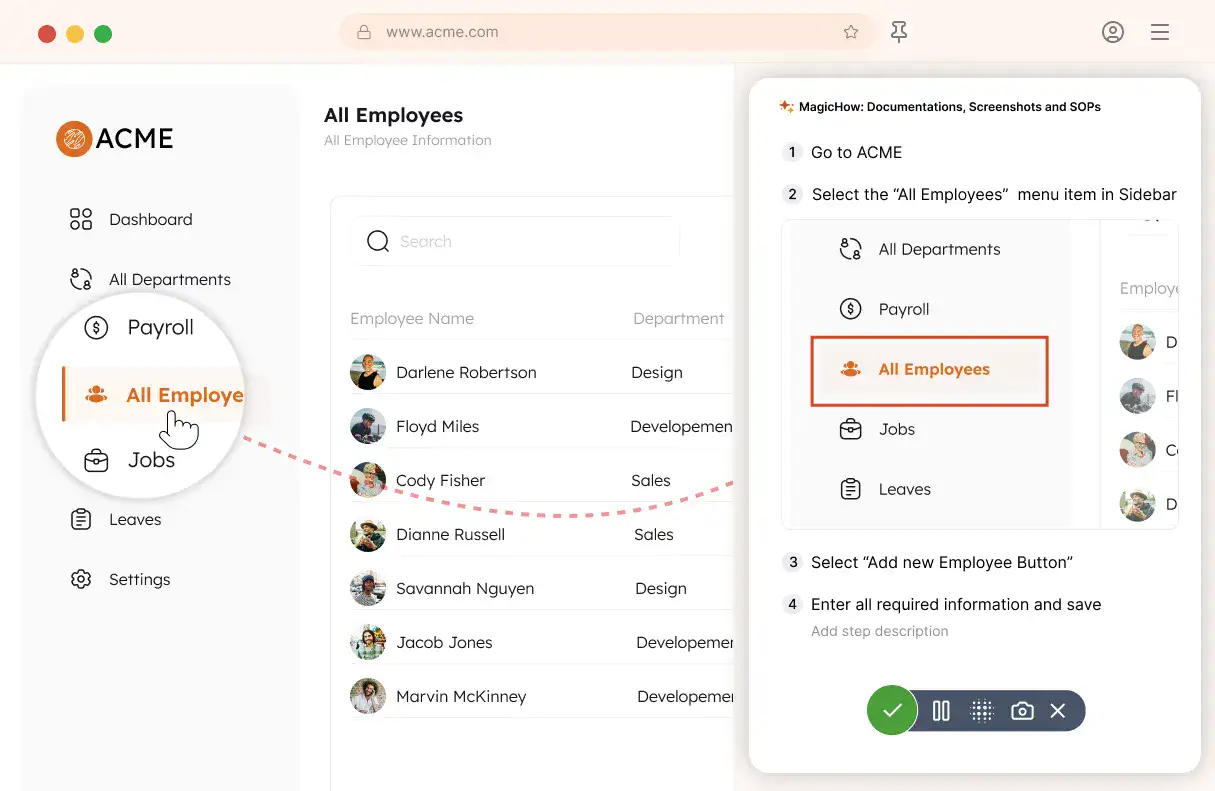
Capture your process
Turn everyday work into documentation by capturing your process as you complete it.
- Creating guides while working
- Record any software process
- Turn actions into steps
- No manual writing needed
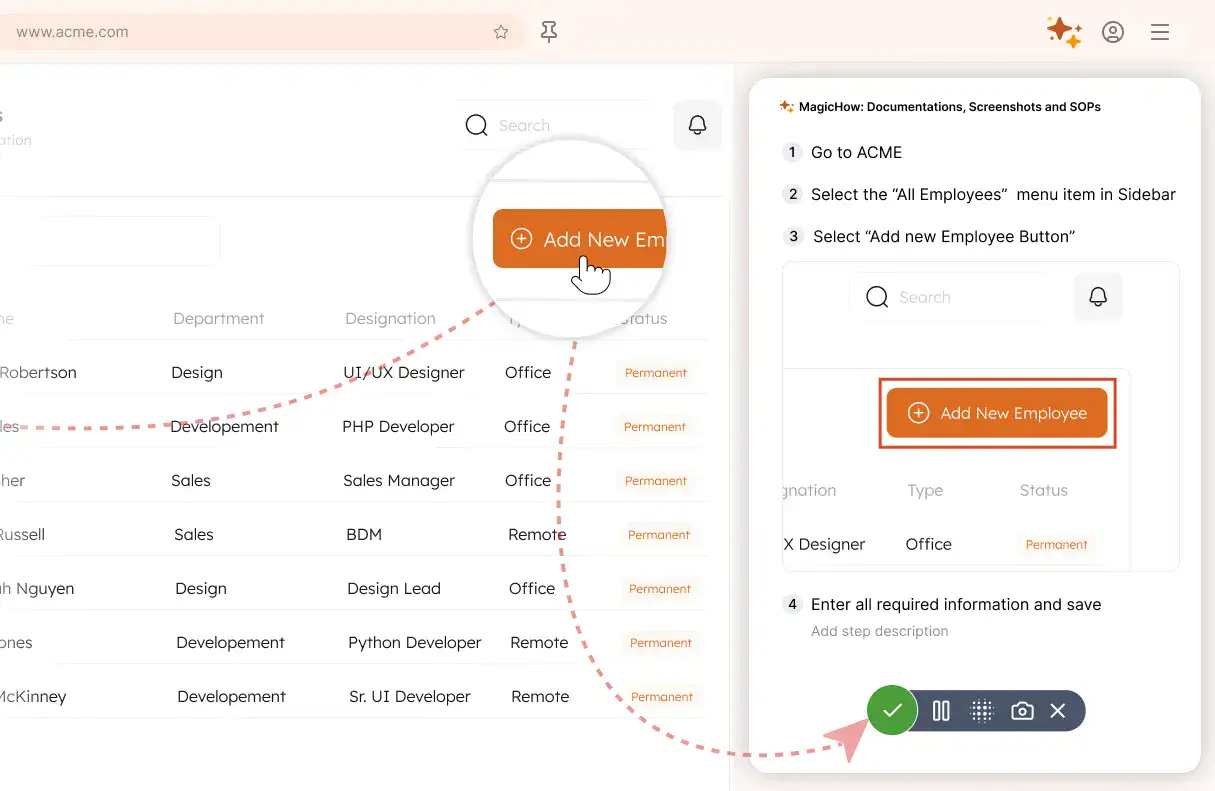
Save your capture
Save your recording, and MagicHow generates a clean, complete step-by-step guide from your actions.
- Turns actions into instructions
- Clean step-by-step output
- No steps missed
- One capture becomes documentation
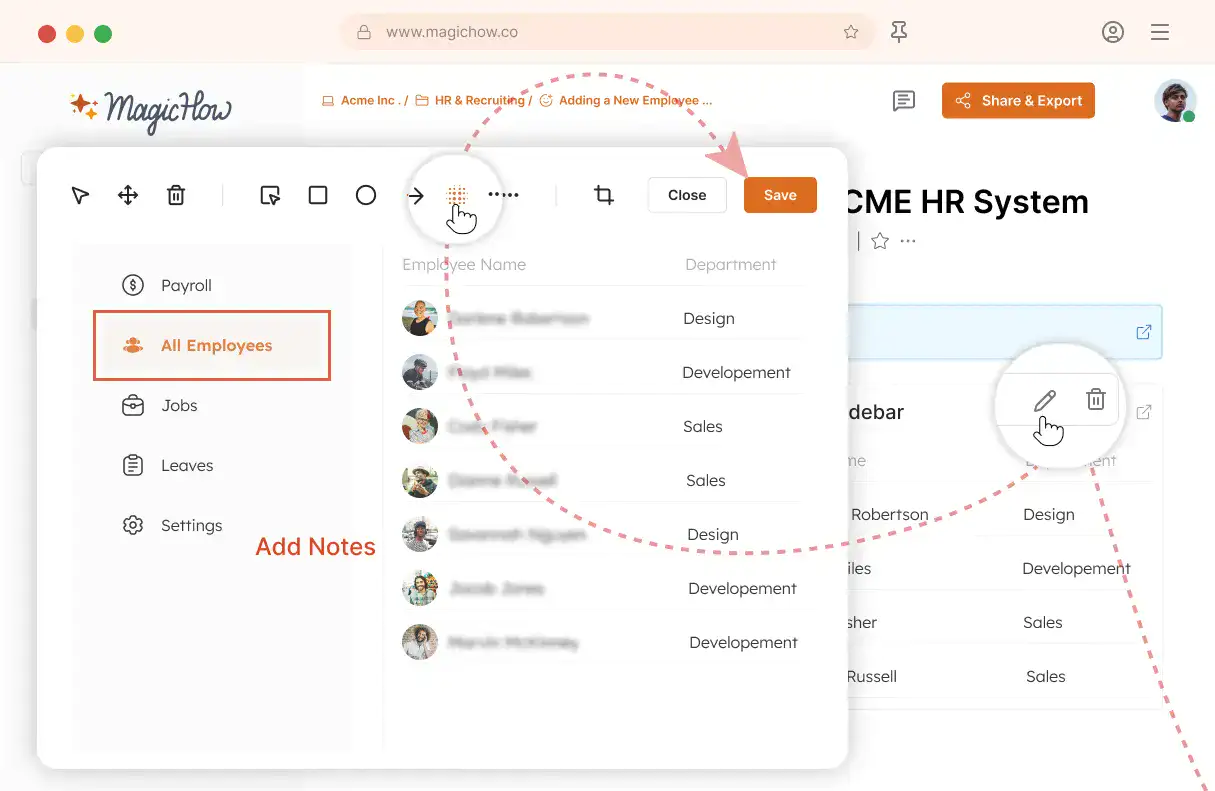
Edit and customize
Quickly improve your guide with edits, AI polishing, and rich content like notes, links, videos, and diagrams.
- Add notes and tips
- Blur sensitive information
- Polish guides in minutes with AI
- Insert links and resources
- Add videos and diagrams
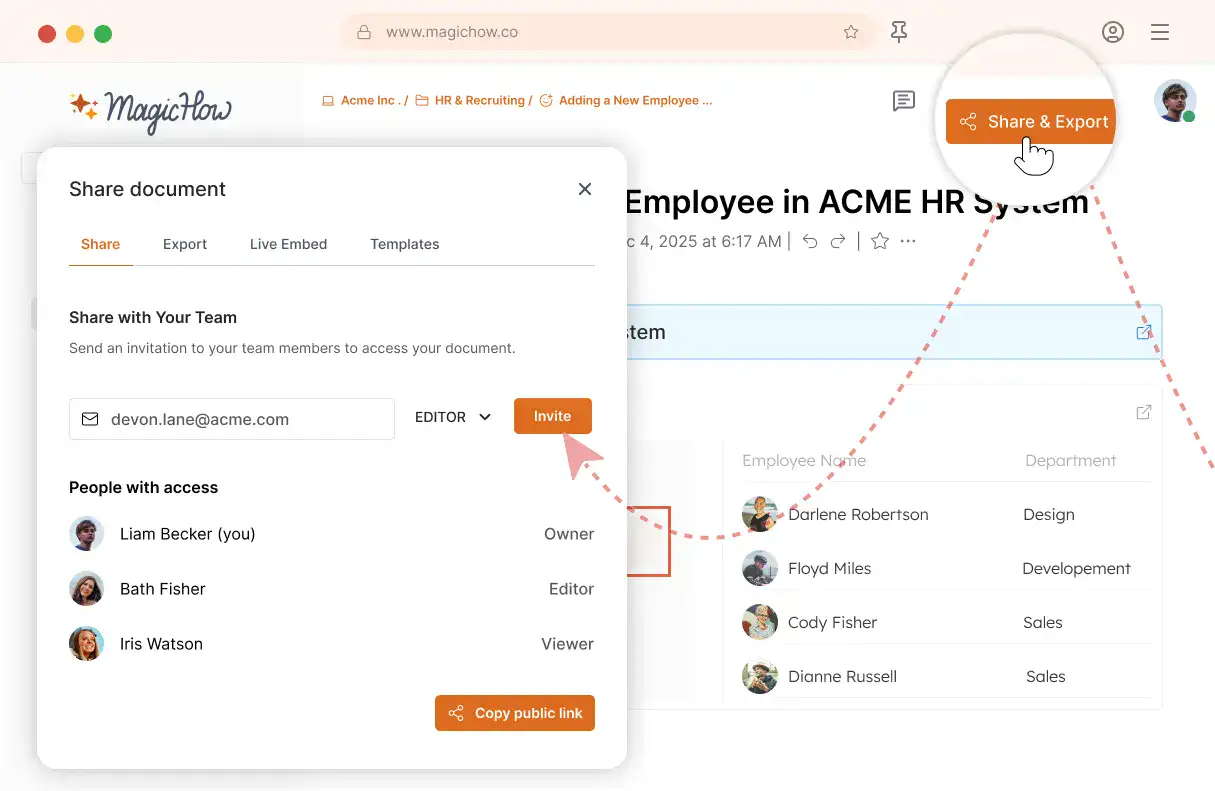
Share with your team
Share guides securely with your team, control access, embed in documentation, or export in multiple formats.
- Invite users to your workspace
- Keep knowledge centralized
- Send public access link
- Export PDF, Word, Markdown
- Control access rights
- Embed in your documentation
Document Processes and Share Guides with Your Sales Team Easily
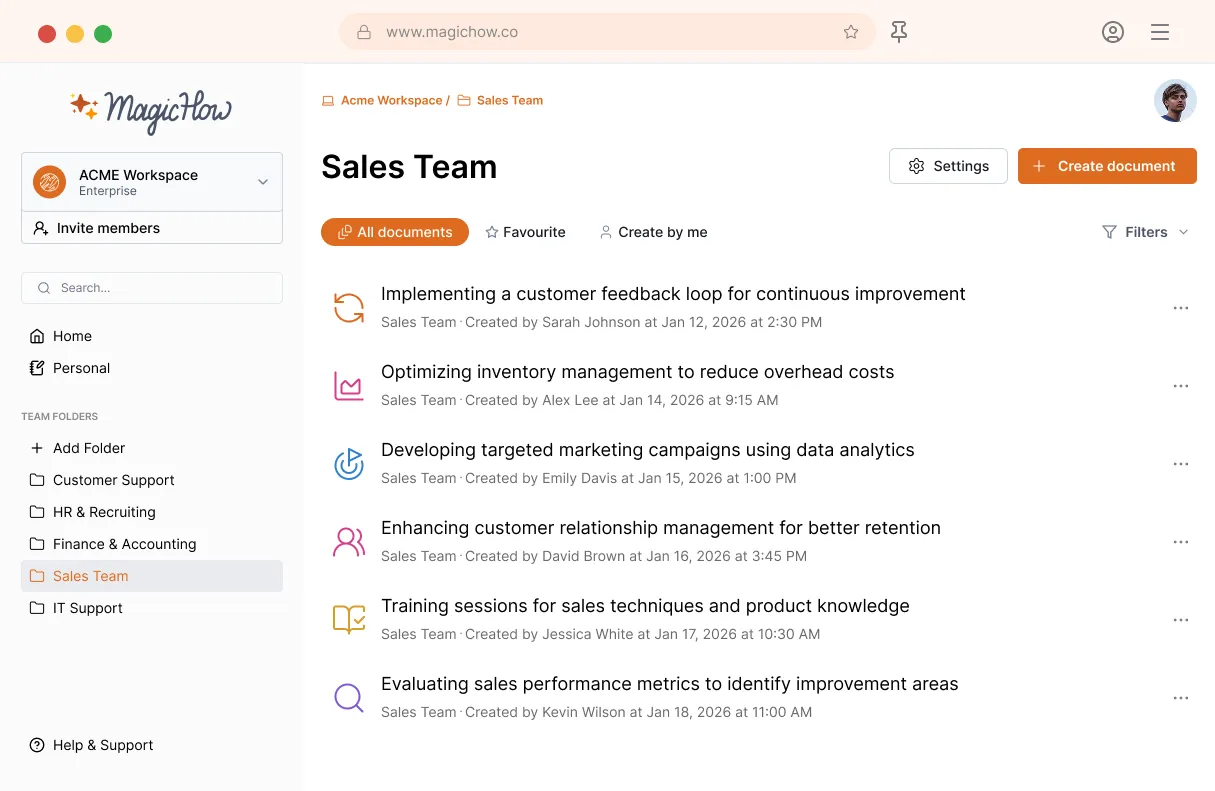
MagicHow for Sales Teams
Chances are, you want to share proven sales processes with your team. With MagicHow, you can create step-by-step instructions for using sales tools and software, then share clear guides with sales managers, representatives, and the entire sales team.
Get startedCreate Guides for Any Sales Software
Customer Relationship Management (CRM) software
Sales Performance Management (SPM) software
Sales Enablement Software
Business Intelligence (BI) and Analytics Software
Your Sales Team Aligned
Create clear instructions that every representative and manager could follow the same standards across sales processes and tools.
Raised Productivity
With MagicHow, your sales team is always empowered with a comprehensive set of guides that regulate managers' everyday actions. Sales managers' activities are streamlined, straightforward, and bring more impressive results.
Enhanced Collaboration
Due to process standardization, your sales professionals are always on the same page. They can answer requests quickly and provide colleagues with relevant, up-to-date information and easy-shareable documentation.
Independence from Support
Your sales representatives can resolve and troubleshoot issues on their own by referring to your knowledge base and SOPs. This prevents delays in responding to client inquiries and enhances client retention.
Fast Onboarding
Help new hires immerse themselves into sales processes in no time. Benefit from sales professionals who contribute to your business from day one and aren't prone to errors and delays.
Enhanced Personalization
Your sales managers have instructions for the most ambiguous situations in place; thus, they aren't distracted by potential pressure and can provide personalized solutions for the customers.
Higher Quality of Service
Instructions, manuals, and SOPs make sales processes more organized and concise. Clearer goals, standardized procedures, and automated routines contribute to smoother operations, increased efficiency, and enhanced customer satisfaction.
Optimize Documentation for Your Sales Team With MagicHow
Got Questions?
If you can't find what you're looking for, get in touch.
How to Create Standard Operating Procedure for Sales with MagicHow?
MagicHow is a tool for the automated creation of guides, SOPs, and other instructional materials for using the software. As a result, it is particularly useful for creating SOPs related to CRM, CPM, BI, analytics, sales enablement, and other software commonly used by sales professionals on a daily basis.For example, with MagicHow, you can create SOPs for a variety of tasks associated with using CRM systems:
lead management – how to enter and update leads;
account management – how to maintain customer accounts, log customer interactions, and plan accounting operations;
activity tracking – how to record and track sales activities (calls, emails, meetings);
setting reminders and follow-up tasks, and analyzing activity data for performance evaluation;
reporting and analytics – how to generate standard reports on sales performance, pipeline, and conversion rates.
Since the software is used at every step of the sales process, there is a need for the creation of a large number of instructional materials. MagicHow is ready to assist in every case when you need to get your sales team acquainted with digital tools.For the creation of an SOP for your sales team, three steps are required:
follow the process by yourself while MagicHow records it, splitting the procedure into logical steps;
edit screenshots to tailor your SOP to your goals (blur sensitive data, edit steps' titles, add annotations, modify screenshots' visual style);
share your document with your sales managers while adjusting access settings to your goals (share a link via email, download an SOP as PDF, save it as HTML or Markdown, or embed it to your knowledge base, blog, or other website).
To create an SOP for the sales department with MagicHow, you don't need any skills or manuals. A tool's interface is intuitive and user-friendly, so you'll enjoy the process from the very start.
On Which Devices Can I Use MagicHow?
You can use MagicHow on desktops and laptops. There are two versions of an application: for a desktop and a browser. Using both, you can create SOPs for using any software installed on your computer and for browser extensions. The features of both versions cover all users' needs associated with the necessity of creating instructions for software. Both versions have intuitive interfaces that allow the creation of comprehensive visual SOPs without specialized skills.
How Can I Share Guides and SOPs Created for My Sales Team With MagicHow?
We offer various methods for delivering your presentations:
share your step-by-step guides by providing a link and configuring access settings;
export your manual as a PDF file;
copy your guide in HTML or Markdown format to publish it on external websites;
embed your guide seamlessly into popular tools like Notion or Confluence.
The exciting part is that the information is dynamically updated when you embed your MagicHow product on another site. Any changes or amendments you make will be instantly reflected on the site where the guide is embedded.
How Can I Edit My Guides for a Sales Team Created With MagicHow?
MagicHow allows automated recording of SOPs, guides, and other instructions, providing you the advantage of saving time and energy. However, a tool empowers you with a comprehensive set of opportunities to customize your SOPs. Here is a list of MagicHow's features that make editing possible:
blurring sensitive data;
adding comments and tips;
modifying screenshots' titles;
adding graphic elements;
adding and deleting screenshots;
altering screenshots' visual style.
All critical features are available in the desktop and browser versions.
How Much Does It Cost to Use MagicHow to Create SOPs and Guides for a Sales Department?
You can use all MagicHow's critical functions for the creation of step-by-step guides, SOPs, manuals, and tutorials for free. The functions available in a free version are as follows:
the automated creation of screenshots and their compilation into a full-fledged guiding document;
editing screenshots to customize them;
sharing the documents, downloading, and embedding them.
The Premium version of MagicHow offers users a few advanced features and allows us to invest in the development of the tool.