Create Visual FAQ Answers in Minutes
Turn common questions into clear, step-by-step visual guides. Record a workflow once and generate screenshot-based FAQ answers that customers and teammates can follow without long explanations.
One Tool for Visual FAQs, Support, and Training
MagicHow automatically turns real workflows into visual step-by-step FAQ answers. By showing users exactly how to complete a task. You reduce repetitive support tickets, speed up customer and team onboarding, and keep all documentation consistent and up to date.
Operational Process Standardization
With concise, clear, and accessible FAQs, your team stays aligned. Clear visual answers reduce misunderstandings, errors, and unnecessary friction in everyday workflows.
Providing Customer Support
Empower your customers with clear and easy-to-grasp instructions on how to use filters on your online store, make payments, or track orders. Help them feel confident.
Onboarding New Hires
Ensure a fast and easy process of immersing your new team members into the business by providing visual guides focused on the key tools specialists use.
New Tool Implementation
Shorten the period of the team's adjustment to new software. Enable your colleagues to perform at their highest level right from the start.
Use MagicHow to Create FAQ Answers for Any Process
Knowledge Base
Answer common questions with clear, visual step-by-step guides.
Onboarding
Explain how things work from day one with visual FAQ answers for new users and team members.
Internal Workflows
Create consistent FAQ answers that explain how tasks are completed across teams.
Customer Tasks
Help customers complete key actions by showing exactly what to do, step by step.
Support Operations
Document common resolutions and workflows with visual FAQ answers your team can rely on.
Marketing & Communication
Address recurring questions across landing pages, campaigns, and social channels with visual guides.
Create Guides That Answer FAQs
Simply go through the process yourself, while MagicHow follows your actions and turns them into clear, how-to guides that answer common questions.
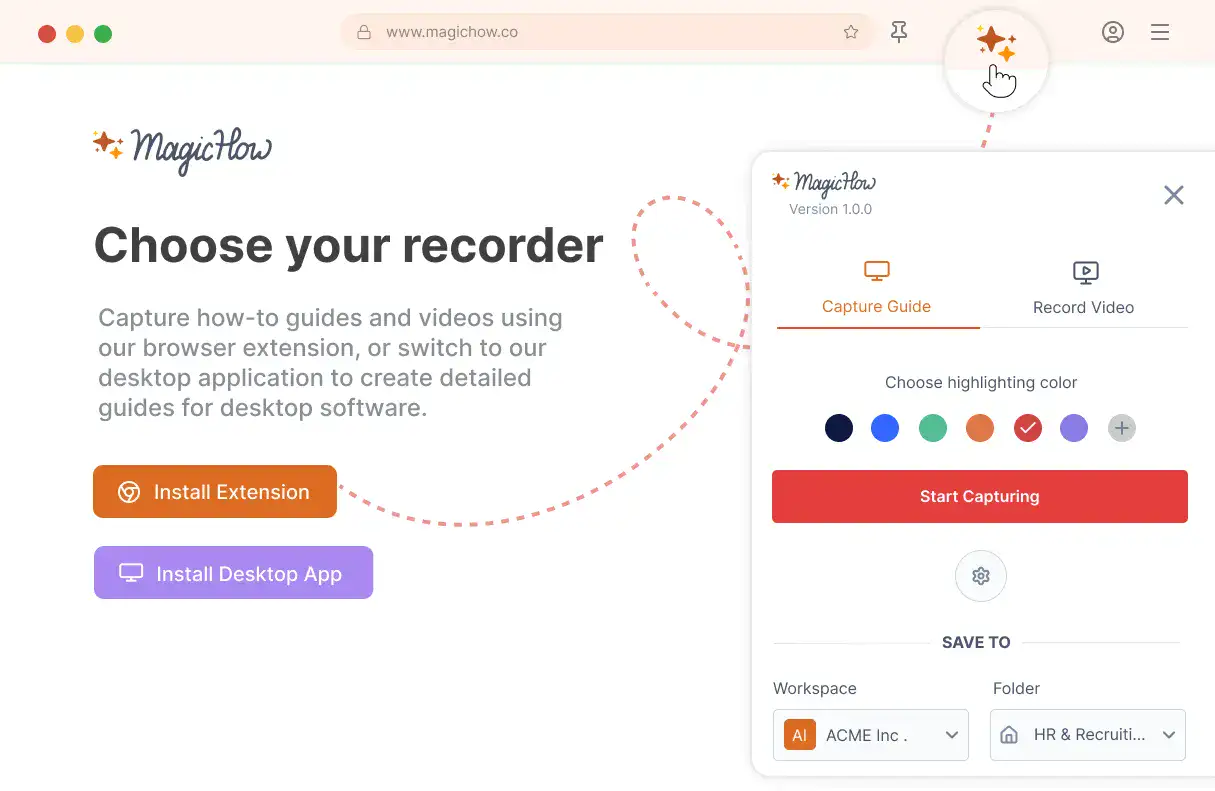
Install MagicHow
Install MagicHow in your browser or on your desktop to start capturing processes across any software in minutes.
- Works in your browser
- Works on desktop (Mac & Windows)
- Works across any software
- Fast, simple, accurate
- Ready in minutes
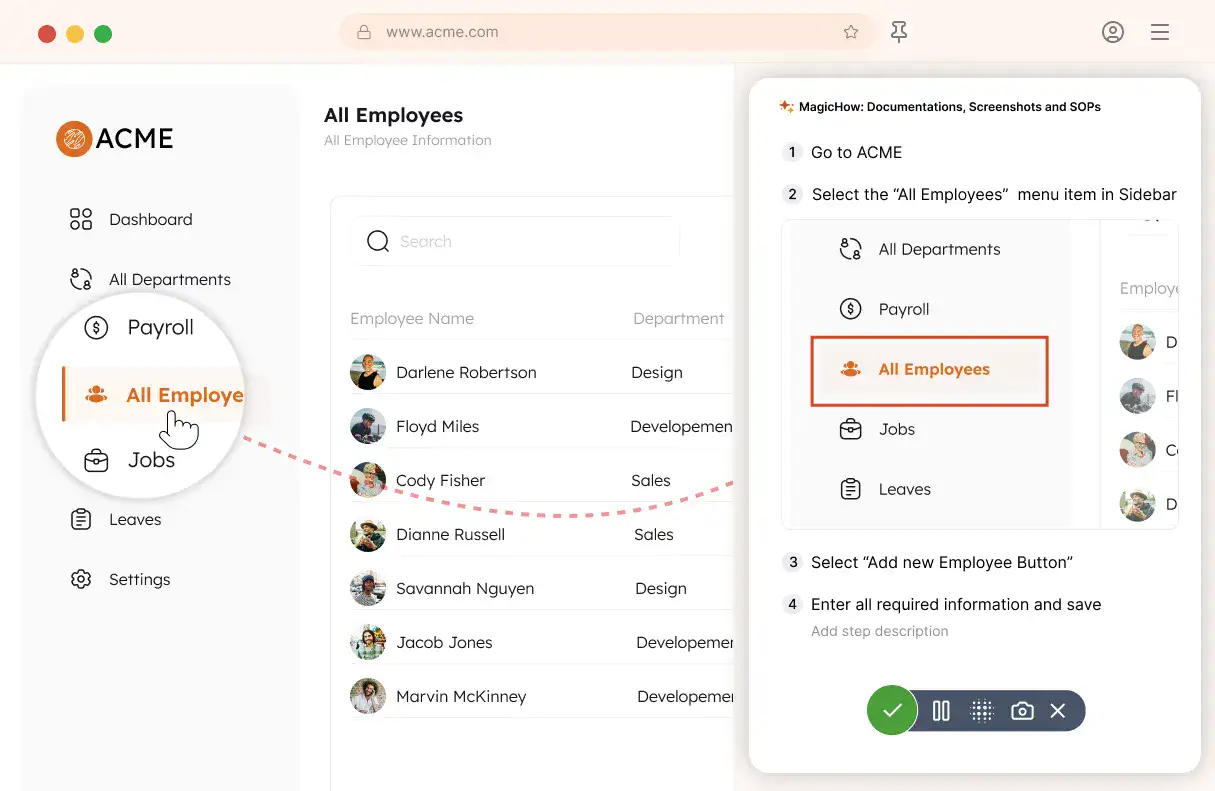
Capture your process
Turn everyday work into documentation by capturing your process as you complete it.
- Creating guides while working
- Record any software process
- Turn actions into steps
- No manual writing needed
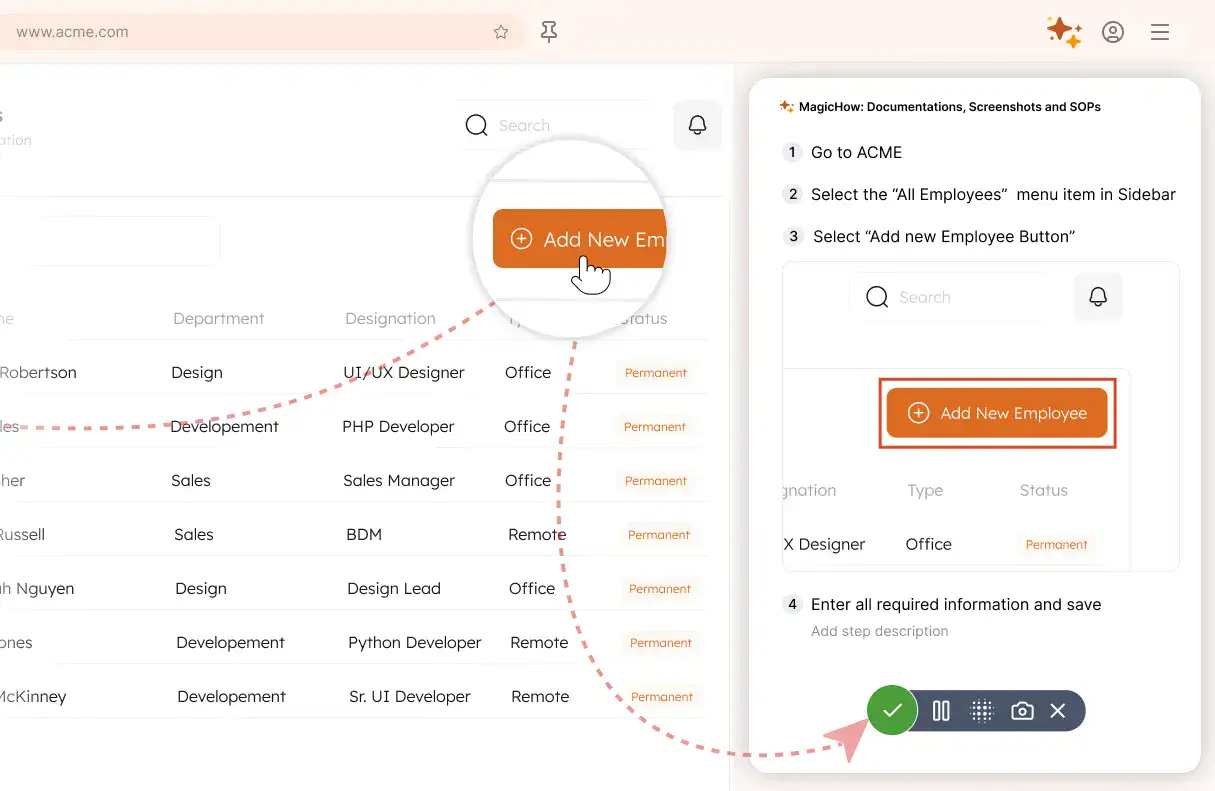
Save your capture
Save your recording, and MagicHow generates a clean, complete step-by-step guide from your actions.
- Turns actions into instructions
- Clean step-by-step output
- No steps missed
- One capture becomes documentation
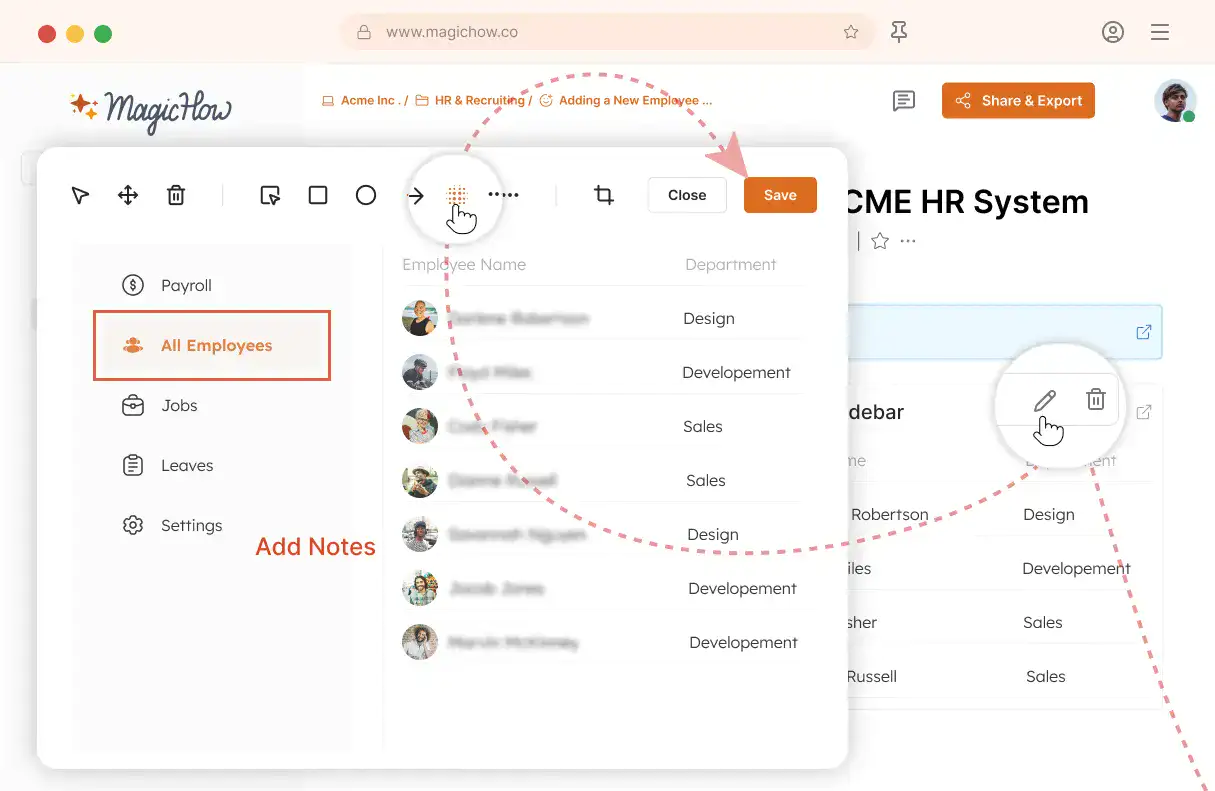
Edit and customize
Quickly improve your guide with edits, AI polishing, and rich content like notes, links, videos, and diagrams.
- Add notes and tips
- Blur sensitive information
- Polish guides in minutes with AI
- Insert links and resources
- Add videos and diagrams
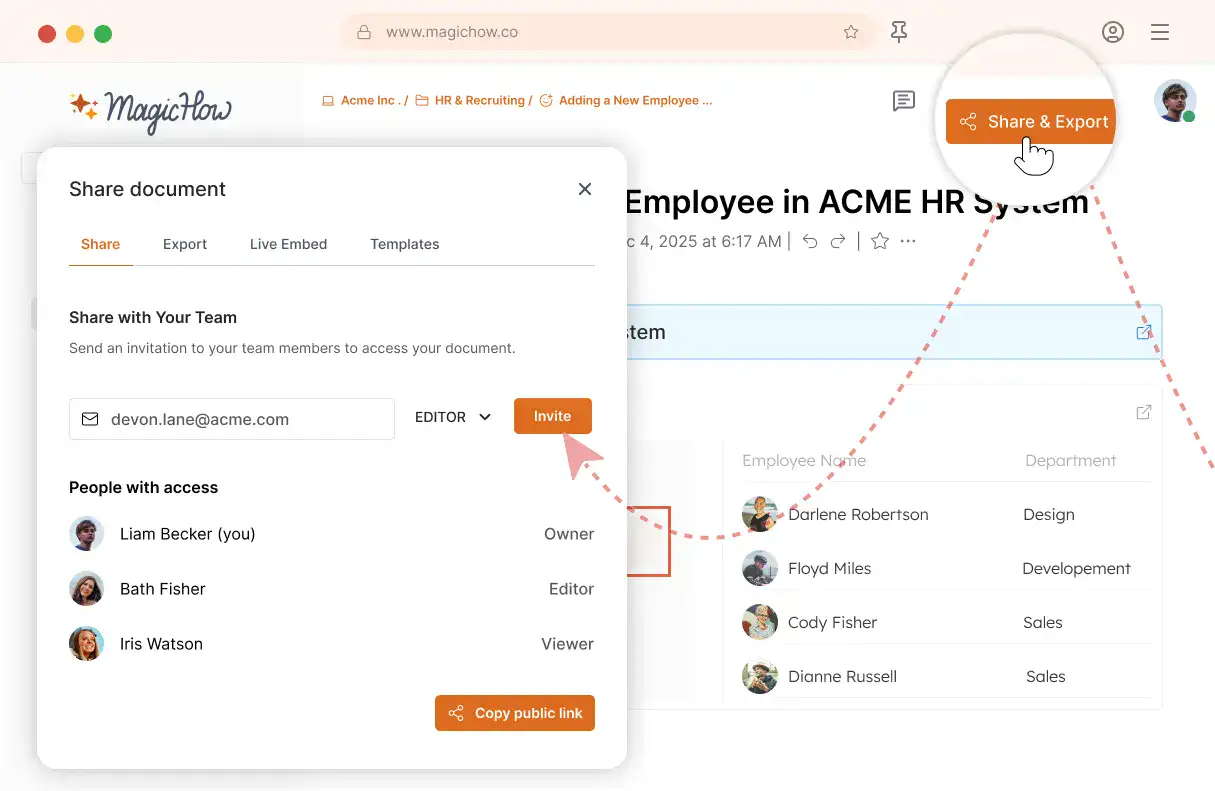
Share with your team
Share guides securely with your team, control access, embed in documentation, or export in multiple formats.
- Invite users to your workspace
- Keep knowledge centralized
- Send public access link
- Export PDF, Word, Markdown
- Control access rights
- Embed in your documentation
Have a Clear Guide for Every Question to Grow with Confidence
Train your teammates and provide guidance to your customers without extra effort.
Proficient Team
Due to the detailed instructions for using software, your team can provide better performance. The number of errors and delays reduces while productivity surges. Each software tool is used with maximum efficiency.
Knowledgeable Clients
The more competent your customers are, the less time and effort is required to provide them with assistance. FAQs are a way to answer the client's inquiries before they are made. Your tech support team will be delighted.
Smooth Workflow
With informative and visual guides, your team can easily avoid distractions and repetitive tasks which steal time and energy. To share the link with a pre-written answer to a how-to question is less time-consuming than contacting a person a providing a consultation.
High Visibility
The abundance of the high-quality content your company delivers to the internet community is a factor of popularity and trustworthy growth. By embedding FAQs on popular topics to websites and sharing guides on social media, you enhance your brand's image.
Have Your FAQ Answers Ready on Time
Got Questions?
If you can't find what you're looking for, get in touch.
How to Write FAQ Answers With MagicHow?
If you need to fill a FAQs section on your website or in your knowledge base with captivating content, consider using MagicHow to create step-by-step instructions. MagicHow will help to create concise, visually appealing, and easy-made FAQ answers associated with using the software. You can create FAQs for the following kinds of content:
a knowledge base for customer support managers, employees, or clients;
an onboarding portal;
an e-learning platform or an educational website;
a corporate blog;
social media posts.
With MagicHow, you can create step-by-step guides for any software your team members or clients use. For example, for customer support managers, you can create an SOP on how to create an account for a client. For an onboarding HR manager, an instruction on using a corporate Applicant Tracking System (ATS) can be useful. A new hire may need a detailed explanation of filling in the forms on an onboarding portal. For all these tasks, you can use MagicHow as a simple yet powerful tool to create automated guides, SOPs, instructions, manuals, tutorials, and other instructional materials.
How to Answer FAQs With MagicHow?
With MagicHow, you can answer FAQs, connected with using software. You can use such answers for the knowledge base for your team or customers, for an onboarding portal, in a blog article, or a social media post. MagicHow allows you to make visual instructions with a detailed explanation of how to use either a browser or a desktop digital tool. Here are a few examples of tasks for which MagicHow can provide a solution:
a how-to guide on requesting a day off through a corporate portal for new hires;
an SOP on generating a sales report in a CRM system for a sales manager;
an instruction on how to create a Gantt chart in Asana for a project manager;
a manual on how to create a new lead in Salesforce for a customer support manager;
a step-by-step guide on how to generate a report on employee overtime usage in Kronos for an HR manager.
For all these tasks and many others, you can use MagicHow as a tool that automates the creation of different kinds of instructional materials. To create a visual guide, you need to perform a process by yourself while MagicHow will capture your every step. The result is a comprehensive guide made within minutes.
How Can I Customize My MagicHow FAQs Answers?
MagicHow makes answers to FAQs about using software automatically: it's visual instructions made by a tool while you use the software. MagicHow captures your actions step by step, makes screenshots, and compiles them into a comprehensive document. The whole task is performed automatically. However, users have plenty of opportunities to customize their guides, SOPs, instructions, and other instructional documents required in the FAQs sections. The opportunities for editing a document are as follows:
amending screenshots' titles;
changing the order of the screenshots, adding and deleting them;
adding comments, tips, and alerts to the screenshots;
incorporating graphic elements to focus users' attention on particular details;
blurring sensitive information;
= adding logos, customizing guides' visual style.
Using MagicHow, you can enjoy the advantage of automated creation of FAQs answers which saves your time and an opportunity to adjust documentation to your target audience's peculiarities.
How Can I Share My Answers to FAQs Created With MagicHow?
There are a few options for delivering your FAQs answers made with MagicHow. All of them allow you to deliver your instructional content easily and swiftly. Here is a list of ways how you can share your answers:
sharing via links;
downloading as PDF;
embedding to a website;
saving and pasting in HTML and Markdown.
All options except the last one provide content updating in a real-time mode. As soon as you change the original document, your readers see the updates.
How Much Does It Cost to Use MagicHow for the Creation of FAQs?
With MagicHow, you can create answers to FAQs in the domain of using software automatically. While you follow the process – post an article through the CMS, create a client’s account in a CRM system, or schedule a project in Jira – MagicHow records your steps, makes screenshots, and compiles them to comprehensive instructions.While answering FAQs questions, you can use MagicHow broadly to show the process, not to explain it with words. On the other hand, you can incorporate as much information as you need by including comments, tips, and alerts in your slides. There are several options for documentation customization, such as amending screenshots’ slides, adding graphic elements, blurring confidential information, and modifying the visual style.Guides, instructions, SOPs, and other documents created with MagicHow can be shared easily with particular access settings aligned with your goals. You can deliver your instructions via email, send them as PDFs, past them on a website as HTML, and embed them into third-party websites.All basic MagicHow’s features are available in a free version. The Premium version has some advanced features for even more speedy and comfortable work. The Premium version allows us to enhance our product for a more fruitful experience for you.