Clear operations start with clear documentation
Document your processes and turn how work is done into clear, reliable how-to guides your team can follow
Organize and Manage Your Process Documentation in One Place
Keep all your how-to guides and process documentation structured by business area. MagicHow helps your team find the right instructions instantly, stay aligned on how work gets done, and improve day-to-day operations without complex tools or manual upkeep.
Customer Relationship Management (CRM)
Create instructions for managing clients' interactions, tracking leads, and storing customer data. Enhance your sales managers' competence to increase profits.
Enterprise Resource Planning (ERP)
Enhance your team's operational efficiency by providing managers with visual guides on using applications to automate core business processes and facilitate the flow of data.
Project Management
Document each step of projects lifecycle for effective information exchange within your team and synchronization of efforts. Make project management clear for every person involved.
Financial Management
Improve the effectiveness of accounting, budgeting, invoicing, and financial reporting by creating detailed and visual guides for using software. Help your team build financial consistency.
Supply Chain Management (SCM)
Empower your team with knowledge of effective software for supply chain optimization: demand planning, inventory management, logistics and transportation, warehouse management, and analytics.
Business Analytics and Reporting
Streamline the efforts of your business analytics team to effectively search for insights that support grounded decision-making. Ensure that your analytics team utilizes software tools productively.
Human Resources Management
Provide your HR managers with Standard Operating Procedures (SOPs) for efficient use of software tools for onboarding, performance management, payroll processing, and benefits administration.
Communication and Collaboration
Create clear instructions for internal communication tools to support consistent team collaboration.
Marketing and Digital Advertising
Create visual Standard Operating Procedures (SOPs) that document how your marketing team uses marketing automation tools, helping teams work more productively and onboard faster.
Customer Support
Help your customer support managers be proficient at using software tools for managing customer inquiries, tracking support tickets, and providing timely assistance.
Operational Documents You Can Create With MagicHow
Standard Operating Procedures (SOPs)
Step-by-Step How-To Instructions
Visual Guides
Training Manuals
Process Documentation
Onboarding & Internal Knowledge Documentation
Create Operational Documentation With MagicHow
MagicHow helps operations teams turn everyday processes into clear, repeatable documentation. From Standard Operating Procedures (SOPs) to training and onboarding materials, you can standardize how work gets done and keep knowledge consistent as your team scales.
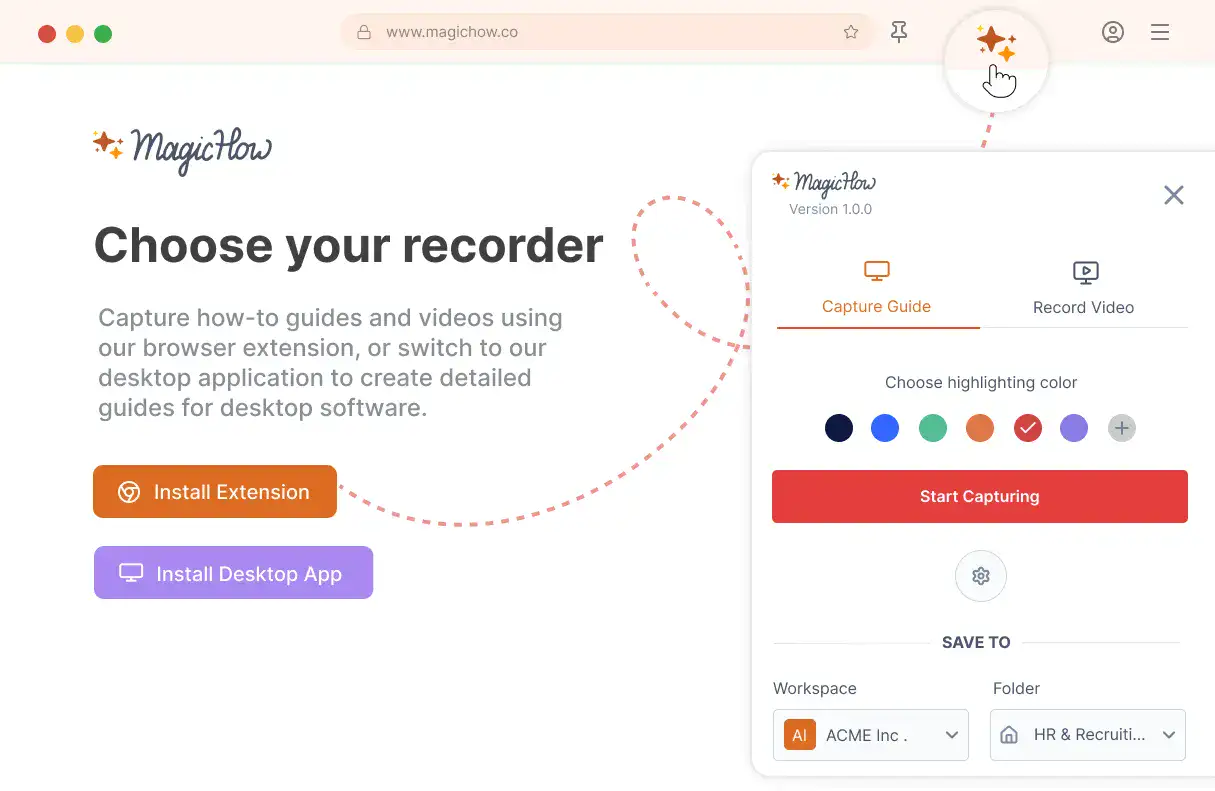
Install MagicHow
Install MagicHow in your browser or on your desktop to start capturing processes across any software in minutes.
- Works in your browser
- Works on desktop (Mac & Windows)
- Works across any software
- Fast, simple, accurate
- Ready in minutes
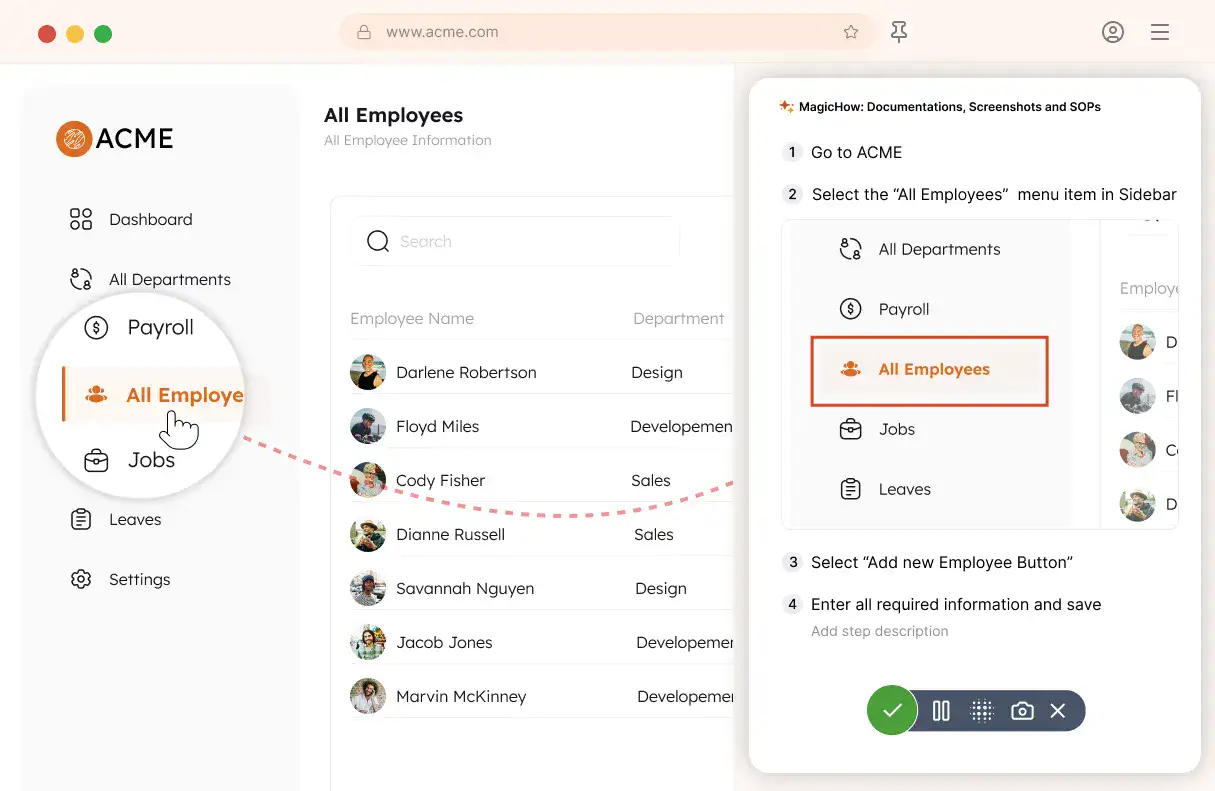
Capture your process
Turn everyday work into documentation by capturing your process as you complete it.
- Creating guides while working
- Record any software process
- Turn actions into steps
- No manual writing needed
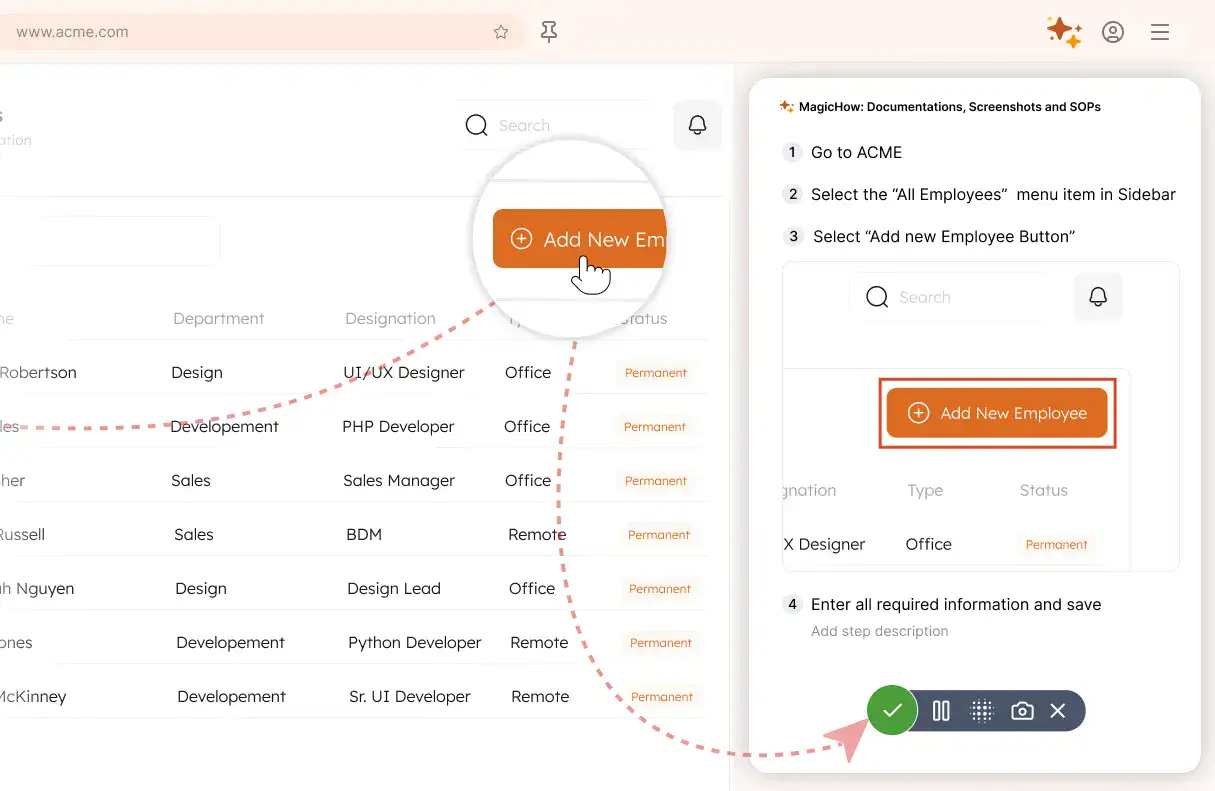
Save your capture
Save your recording, and MagicHow generates a clean, complete step-by-step guide from your actions.
- Turns actions into instructions
- Clean step-by-step output
- No steps missed
- One capture becomes documentation
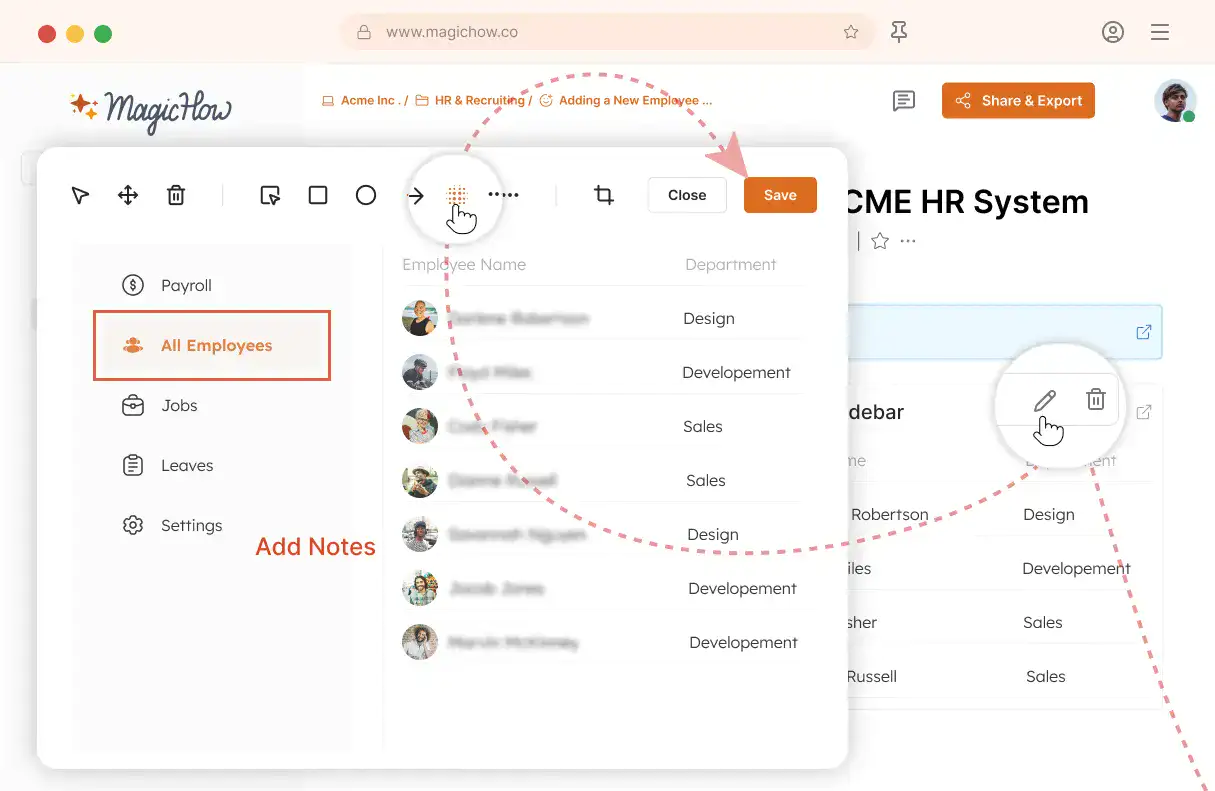
Edit and customize
Quickly improve your guide with edits, AI polishing, and rich content like notes, links, videos, and diagrams.
- Add notes and tips
- Blur sensitive information
- Polish guides in minutes with AI
- Insert links and resources
- Add videos and diagrams
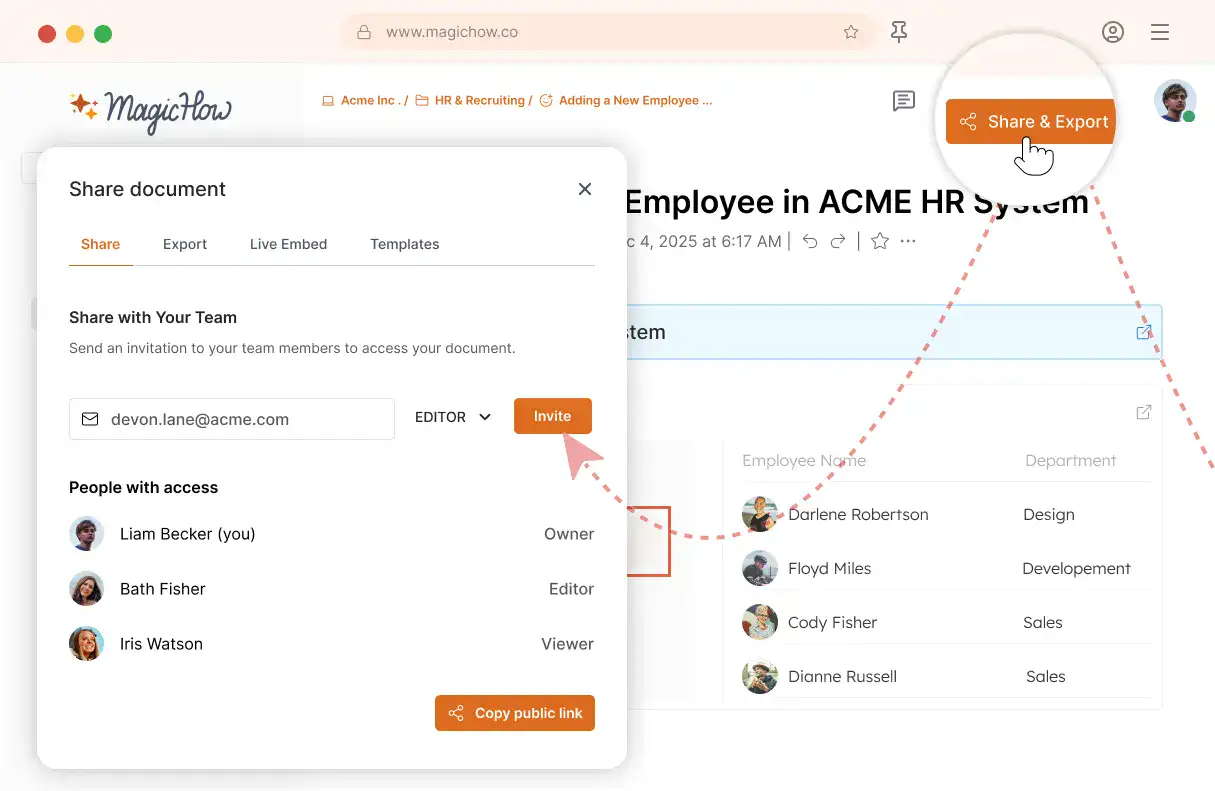
Share with your team
Share guides securely with your team, control access, embed in documentation, or export in multiple formats.
- Invite users to your workspace
- Keep knowledge centralized
- Send public access link
- Export PDF, Word, Markdown
- Control access rights
- Embed in your documentation
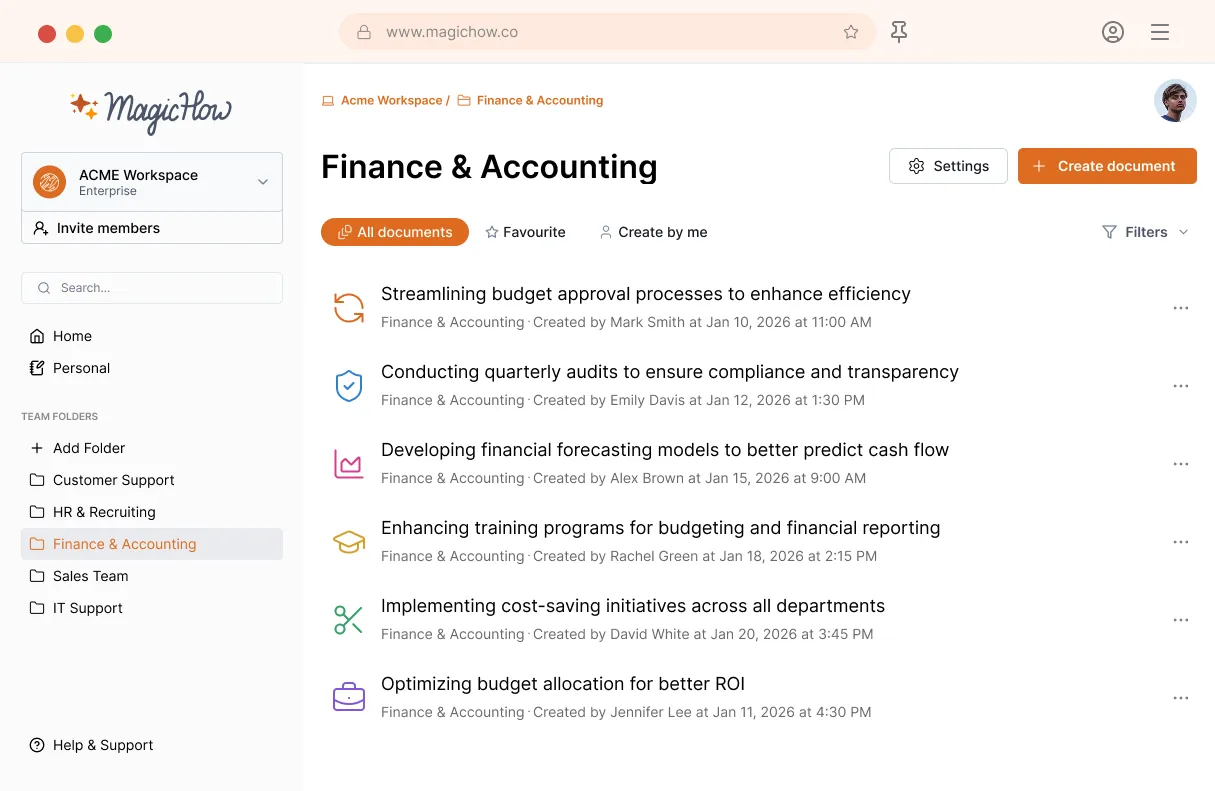
MagicHow for Documenting Operational Processes
MagicHow helps operations teams document how work is actually done. Capture real processes as you perform them and turn them into clear, visual documentation that can be shared across the team for execution, training, and onboarding.
Get StartedBenefit from Synchronized Teamwork, Enhanced Productivity, and Concise Processes
Create step-by-step guides, Standard Operating Procedures (SOPs), training manuals, how-to instructions, and tutorials to synchronize your team’s work, improve communication, reduce errors, and enhance performance.
Process Standardization
The formalization of the processes and procedures streamlines the workflow and makes it easier to coordinate. When activities follow the uniform procedures, the number of missteps reduces, rework is minimized, and productivity surges.
Algorithmization
By providing your employees with guidance adhered to the formal procedures, you support seamless workflow. When every team member follows the expected and predictable course of actions, the risk of errors and delays is close to zero.
Enhanced Productivity
Algorithmization and process clarification make it possible to avoid unnecessary repetition in activities, eliminate confusion in the sequence of actions, and incentivize smoother collaboration. As a result, productivity and motivation arise.
Easy Onboarding
Having the detailed descriptions of the key processes and procedures under your belt, you can reduce the adaptation period for new hires and help them get up to speed quickly. Visual instructions can also assist your new teammates in performing well.
Productive Training
Ensure that your new team members have an opportunity to obtain new software tools as quickly as possible. Provide your employees with visual instructions once you implement new software and benefit from smooth workflow from day one.
Strengthened Communication
When your SOPs, instructions, and manuals are prepared and can be easily shared, you don’t need to answer the same questions of your clients and colleagues. You have time and energy to develop your field of expertise and offer innovative solutions.
Create How-to guides for Key Processes
Got Questions?
If you can't find what you're looking for, get in touch.
How Can I Document Operational Processes With MagicHow?
MagicHow is a software tool for automated creation of step-by-step guides, SOPs, manuals and other kinds of instructions for operations in which software is used. With MagicHow, you can create a guide on how to track applicants through Applicant tracking system (ATS) for an HR manager, an SOP on how to track tickets using a ticketing system for a customer support manager, or a manual on how to record financial transactions with accounting software for accountants. Here are some more examples of guiding documents your business may require - for composing which you can use MagicHow:
a manual on how to create a project timeline in Asana;
a guide on how to use matplotlib in Python to create a plot;
an instruction on how to draw a poster using Canva;
an SOP on how to prepare a conversion report in Google Analytics;
a guide on how to track packages in real time using an Amazon Tracking.
With MagicHow, you can create guiding documents for a wide range of tasks in different business fields, such as Human Resources, project management, marketing, logistics, software development, accounting, and data analysis. Within these domains, you can create guides for each operation which requires using software.
With MagicHow as your assistant, it's easy to learn how to document operational performance. Simply follow the process step-by-step, allowing MagicHow to record your actions. The tool will make screenshots and compile them into a comprehensive document that can be shared with your employees, colleagues, and clients with a few clicks. Unlike in case of video recording, you don’t need to worry about the speed of recording. In addition, you don’t need to rerecord a process if you do a misstep - MagicHow will help you edit your instructions later, when you have an opportunity to delete or add screenshots, add a logo and graphic elements, modify titles, and provide your slides with comments.
It will take about a few minutes to document a simple process such as the creation of an account on a corporate website. It may take you up to ten minutes to create an SOP for a more complex procedure, such as tracking support requests in Zendesk.
How Can I Edit My Proccess Documentation Made With MagicHow?
MagicHow provides automated documentation of operations performed using software. However, you can customize your instruction when the document draft is ready. There are several opportunities to edit your guiding documents:
deleting or adding screenshots;
adding comments and tips;
blurring sensitive information;
modifying titles;
inserting graphic elements.
You can also update your guiding documents at any time to keep the content up-to-date. Whether your reader will see the changes as soon as you implement them, depends on the format you save and share your instructions. Share a link or embed your documentation into a knowledge base or a portal so that your audience stay updated with your content modifications. If you save a document in PDF or copy it in HTML or Markdown format, it will remain intact.
How Can I Share My Operational Documentation Made With MagicHow?
MagicHow helps create easily shareable operational documentation that can be seamlessly delivered to a wide audience. There are a few options for sharing your guiding content:
emailing it via a link, adjusting the access settings to the audience;
saving it as PDF;
copying it in an HTML or Markdown format;
embedding it to a website.
When you sending a link to your recipients or embed an instruction, your readers see the changes in a document as soon as the modifications are made. In the other two cases, the content remains the same when the original document is edited.
On Which Devices Can I Use MagicHow?
MagicHow is available in two versions: for the browser and for the desktop. Consequently, you can use the tool on your desktop or laptop. The desktop version has the advantage of documenting processes performed with desktop software tools. Additionally, this version can be used without an internet connection. The browser version is compatible with popular browsers, including:
Chrome;
Firefox;
Edge;
Safari.
Both versions of MagicHow empower you with key functionalities, such as automated screenshot creation, editing, and sharing.
How Much Does It Cost to Create Operational Documentation With MagicHow?
Our goal is to make our tool accessible to as many managers as possible, enabling them to save time and effort when creating guides, tutorials, instructions, SOPs, and other types of process documentation. That's why we provide the majority of our features completely free of charge. However, to further enhance and improve our product, we offer some additional paid features at an affordable price. Your support enables us to continue developing and enhancing our tool for your benefit.